Auth, Explained: 9 Authentication & Authorization Concepts Every Developer Should Know
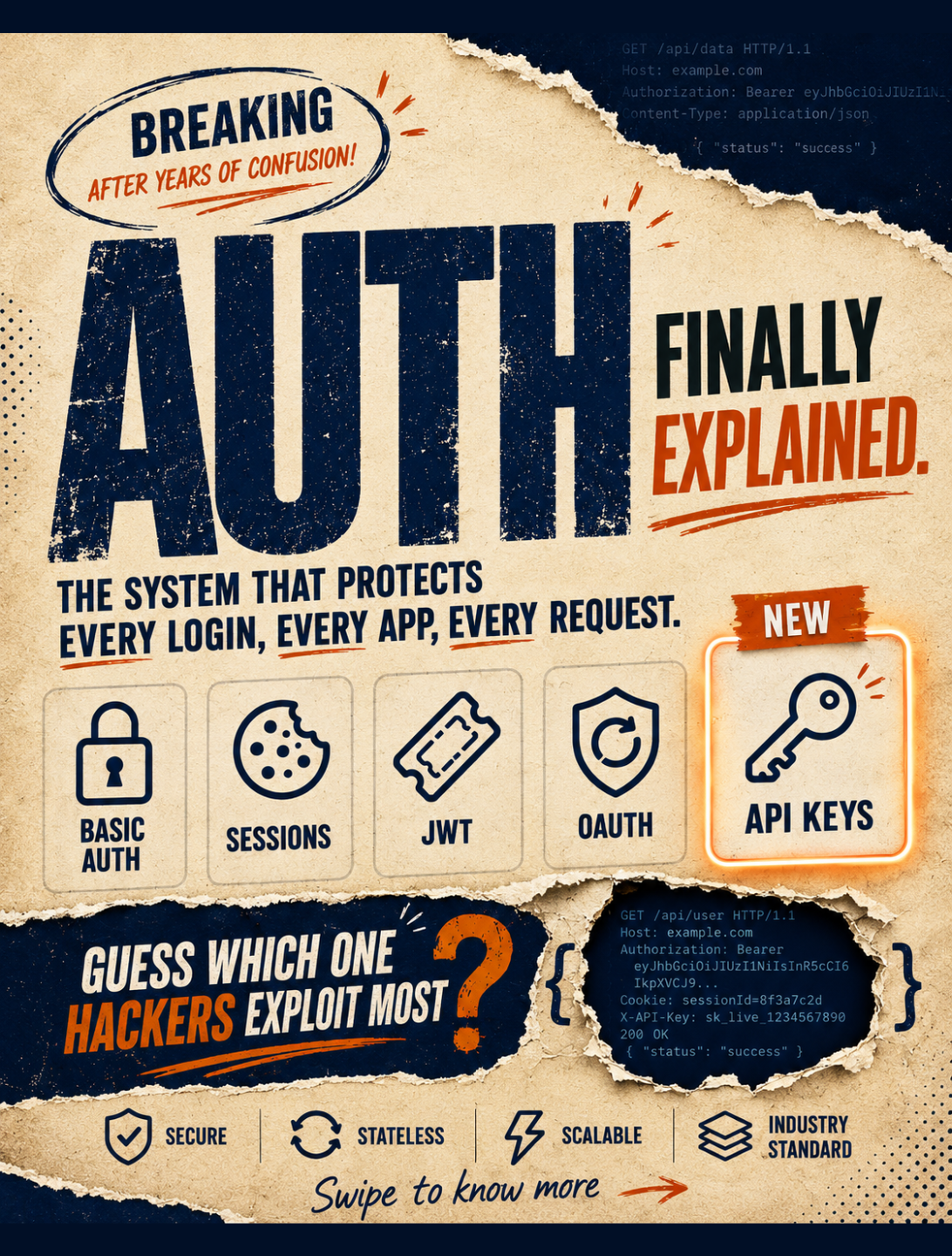
If you've ever built a login system, integrated a "Continue with Google" button, or debugged a mysterious 401 error at 2 AM, you've touched authentication. But "auth" isn't one thing — it's a whole family of overlapping systems, each solving a slightly different problem.
This guide breaks down the 9 concepts that come up again and again in real-world systems, from the oldest and simplest to the ones powering login at Google-scale.
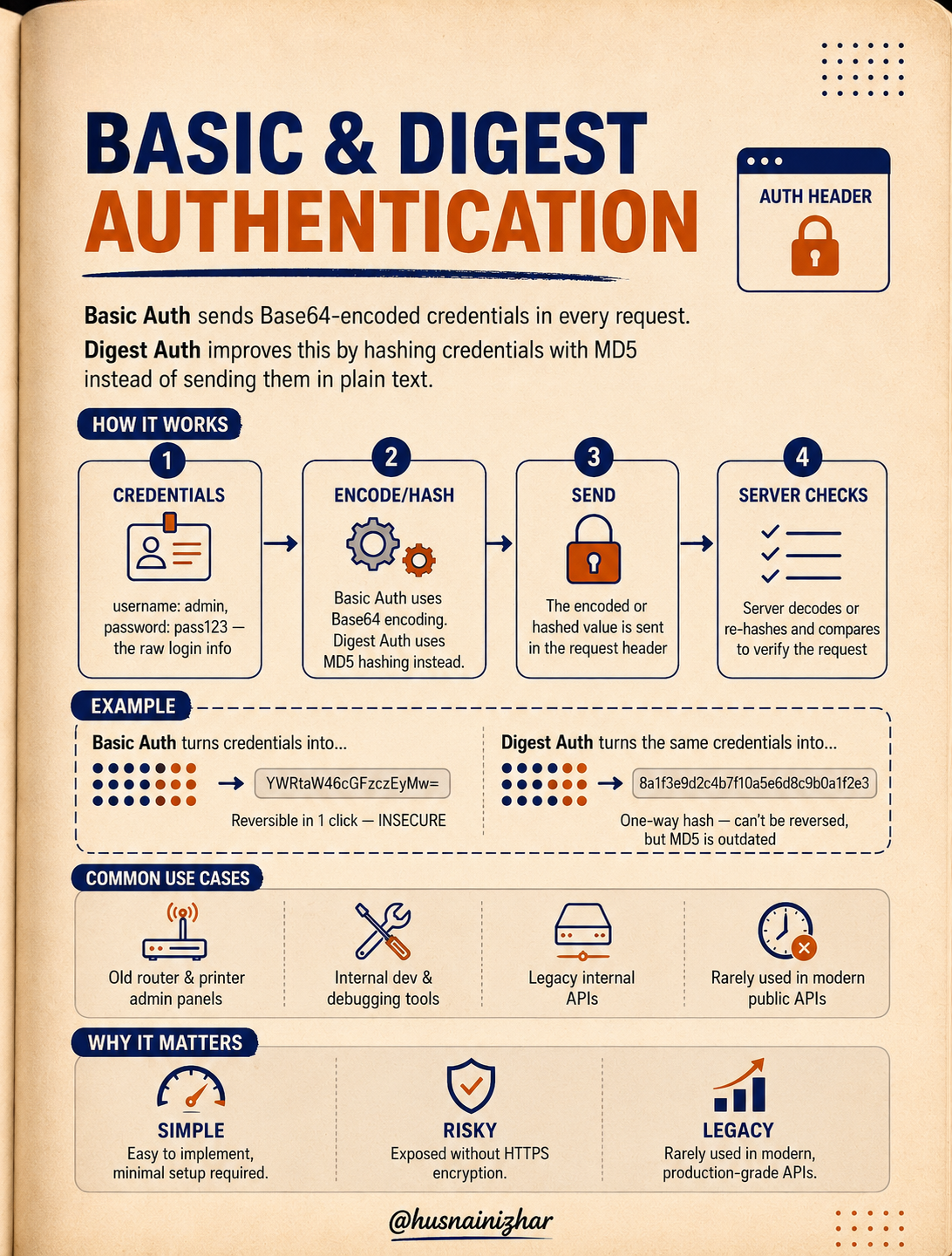
1. Basic & Digest Authentication
The original, no-frills approach to auth.
Basic Auth sends a username and password as Base64-encoded text in every single request header. Digest Auth improves on this slightly by hashing the credentials with MD5 instead of sending them in plain text.
How it works:
- The client collects raw credentials (e.g.,
username: admin,password: pass123) - Basic Auth Base64-encodes them; Digest Auth hashes them with MD5
- The encoded/hashed value is sent in the request header
- The server decodes or re-hashes and compares to verify
Here's the catch: Base64 is encoding, not encryption. YWRtaW46cGFzczEyMw== can be reversed in one click — it's completely insecure without HTTPS. Digest Auth's MD5 hash can't be reversed, but MD5 itself is considered outdated and weak by modern standards.
Where you'll still see it: old router and printer admin panels, internal dev tools, legacy internal APIs. It's rarely used in modern production-grade public APIs.
Why it matters: simple to implement, but risky if exposed without HTTPS — legacy technology that mostly survives in low-stakes, internal environments.
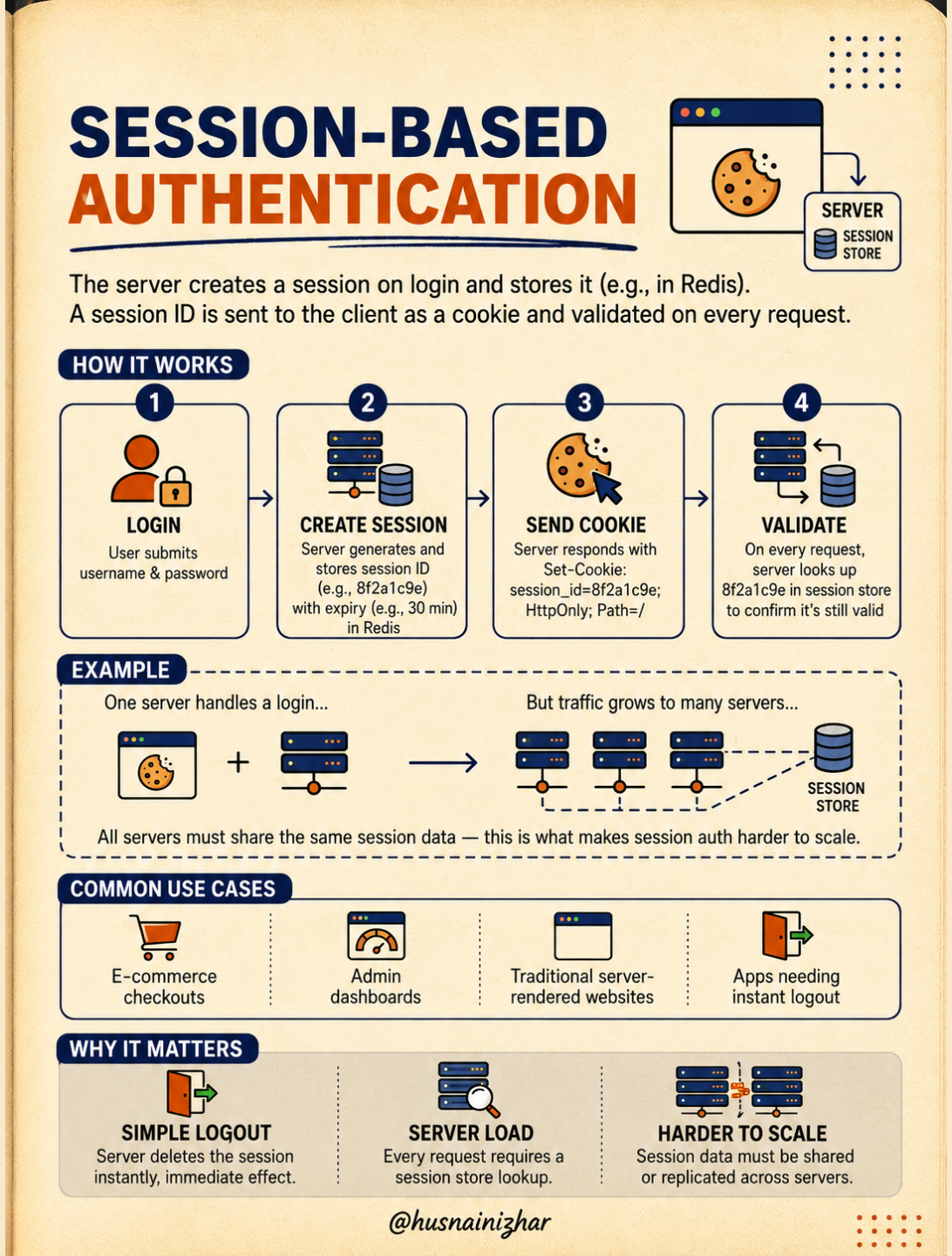
2. Session-Based Authentication
The classic web app pattern most developers learn first.
When a user logs in, the server creates a session, stores it (often in something like Redis), and sends the client a session ID as a cookie. That cookie gets validated on every subsequent request.
How it works:
- Login — user submits username and password
- Create session — server generates a session ID (e.g.,
8f2a1c9e) with an expiry (e.g., 30 minutes) and stores it - Send cookie — server responds with
Set-Cookie: session_id=8f2a1c9e; HttpOnly; Path=/ - Validate — on every request, the server looks up the session ID to confirm it's still valid
The catch: this works great with one server. But once traffic grows and you're running multiple servers, they all need access to the same session data — which is exactly what makes session auth harder to scale. You end up needing a shared session store that every server can query.
Where you'll see it: e-commerce checkouts, admin dashboards, traditional server-rendered websites, and any app that needs instant logout (since the server can just delete the session).
Why it matters: simple logout (delete the session, done), but it adds server load (a lookup on every request) and doesn't scale horizontally without extra infrastructure.
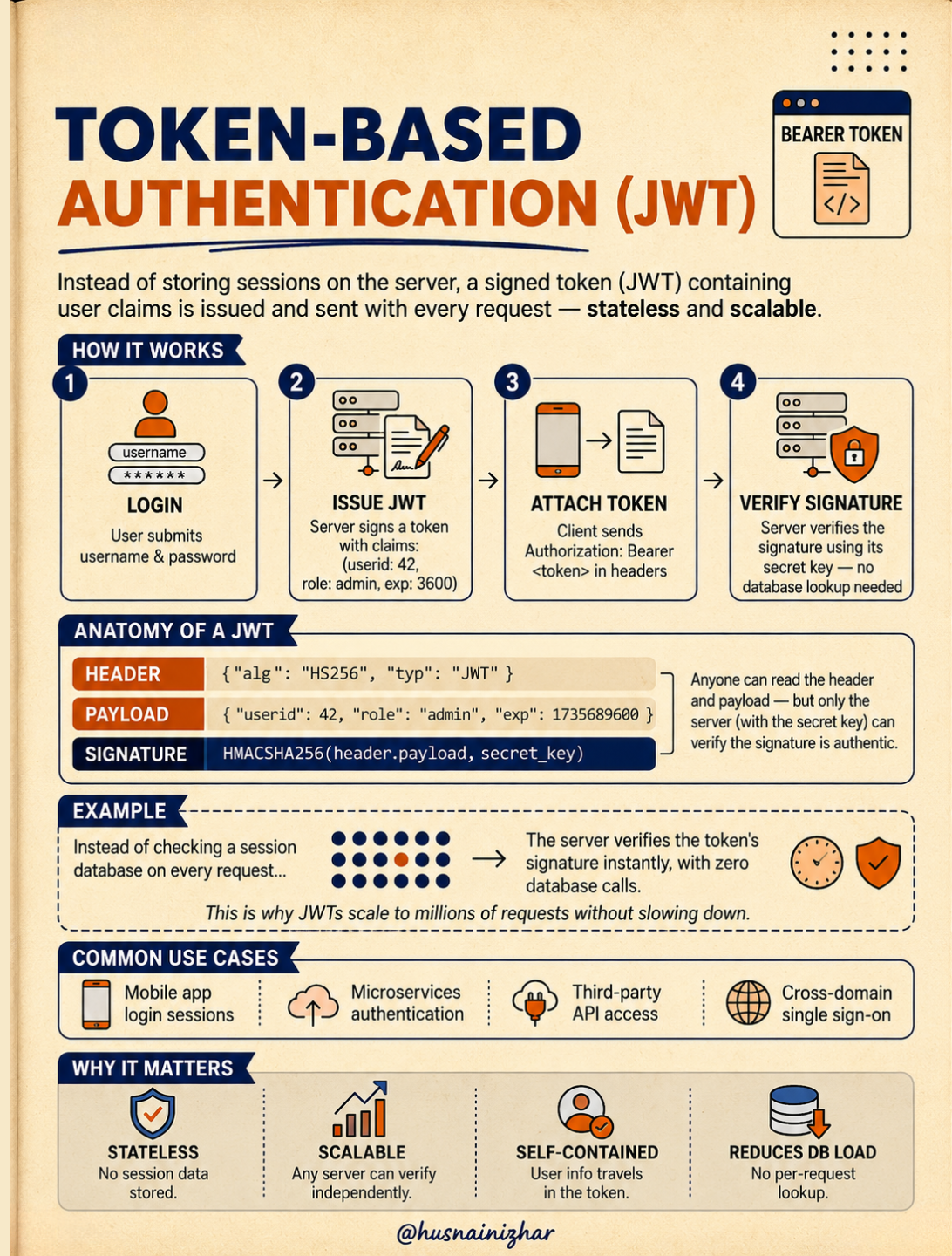
3. Token-Based Authentication (JWT)
The stateless alternative that solves session auth's scaling problem.
Instead of storing session data on the server, a JWT (JSON Web Token) is a signed token containing user claims, issued once and sent with every request. The server never needs a database lookup to verify it.
How it works:
- Login — user submits credentials
- Issue JWT — server signs a token containing claims like
{userid: 42, role: admin, exp: 3600} - Attach token — client sends
Authorization: Bearer <token>in every request header - Verify signature — server verifies the signature using its secret key — no database lookup needed
Anatomy of a JWT:
- Header —
{"alg": "HS256", "typ": "JWT"} - Payload —
{"userid": 42, "role": "admin", "exp": 1735689600} - Signature —
HMACSHA256(header.payload, secret_key)
Anyone can read the header and payload (they're just Base64-encoded JSON, not encrypted) — but only the server, holding the secret key, can verify the signature is authentic. That's what makes it trustworthy without being secret.
Why it matters: this is why JWTs scale to millions of requests without slowing down — no per-request database call. They're stateless, scalable, and self-contained (user info travels in the token itself).
Where you'll see it: mobile app login sessions, microservices authentication, third-party API access, cross-domain single sign-on.
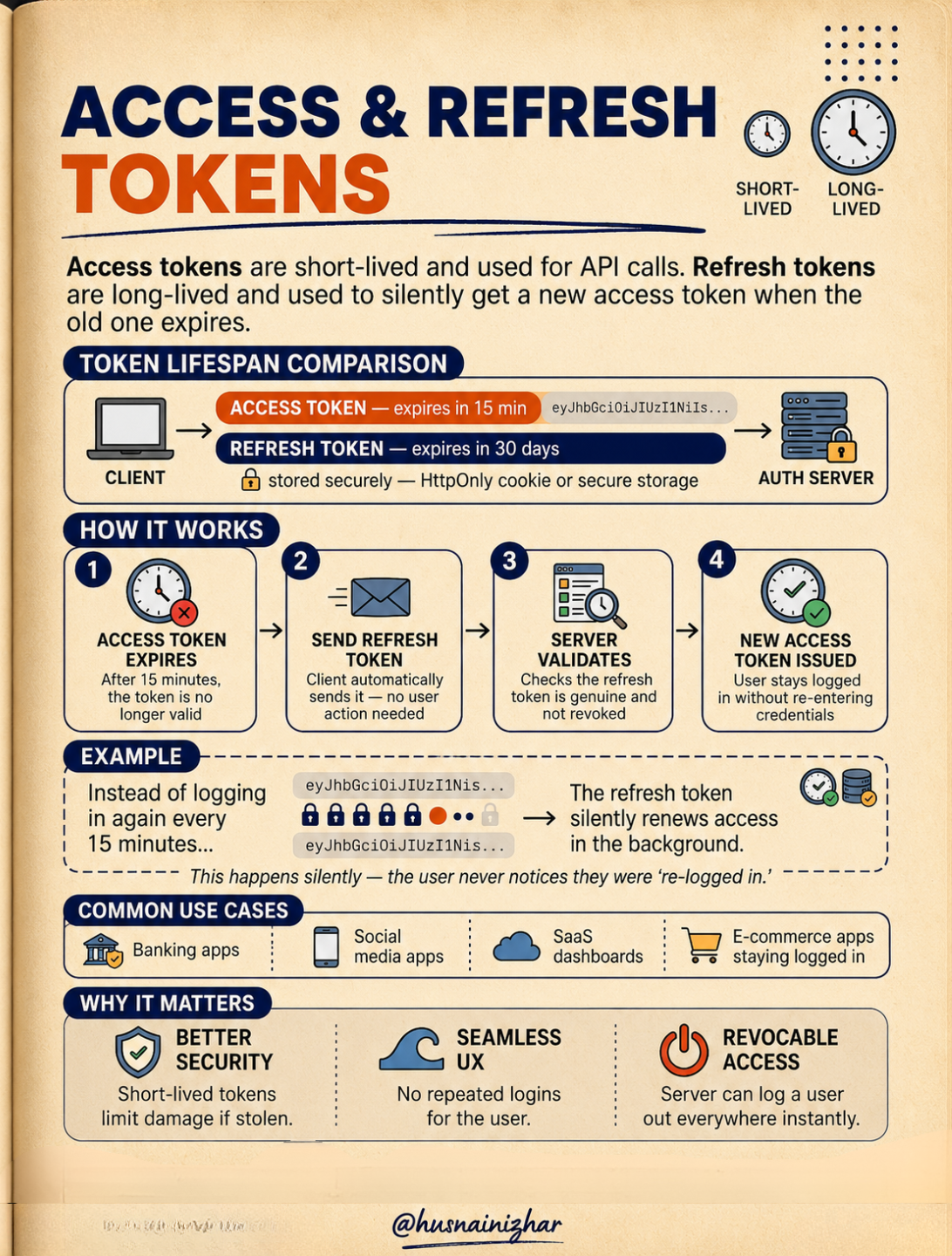
4. Access & Refresh Tokens
JWTs solve scaling — but a single long-lived token is a security liability if it leaks. This is where token pairs come in.
Access tokens are short-lived and used for API calls. Refresh tokens are long-lived and used to silently get a new access token when the old one expires.
How it works:
- Access token expires — after 15 minutes, it's no longer valid
- Send refresh token — the client automatically sends it, no user action needed
- Server validates — checks that the refresh token is genuine and not revoked
- New access token issued — the user stays logged in without re-entering credentials
The refresh token is typically stored more securely (HttpOnly cookie or secure storage) since it lives much longer — often 30 days versus the access token's 15 minutes. This happens silently in the background; the user never notices they were "re-logged in."
Why it matters:
- Better security — short-lived access tokens limit damage if one is stolen
- Seamless UX — no repeated logins for the user
- Revocable access — the server can log a user out everywhere instantly by revoking the refresh token
Where you'll see it: banking apps, social media apps, SaaS dashboards, e-commerce apps that keep you logged in.
5. API Keys
Not every auth problem is about logging in a person. Sometimes it's about identifying a service.
An API key is a unique key issued to a client to identify and authenticate it — commonly used for service-to-service communication, not for logging in end users.
How it works:
- Generate — the server creates a unique key, e.g.
sk_live_7f3a9c2e1b4d - Share — the key is given to the client via a developer dashboard or config file
- Attach — the client attaches the key to every request header
- Validate — the server looks up the key in its database and allows or denies the request
There's no username or password involved — the key itself is the identity.
Why it matters:
- Easy to use — simple to generate and integrate
- Risky if leaked — most API keys have no built-in expiry; they work forever until manually revoked
- No user context — an API key identifies the application, not an individual person
Where you'll see it: weather and public data APIs, payment processors, third-party developer tools, machine-to-machine communication.

6. OAuth 2.0
The framework behind every "Continue with Google" button you've ever clicked.
OAuth 2.0 lets a user grant a third-party app limited access to their resources on another service — without sharing their password.
How it works:
- User clicks "Continue with [Provider]" on a third-party app
- Redirect — the app sends the user to the provider's authorization server
- Consent — the user reviews and approves the specific permissions requested
- Access token — the app receives a limited-scope access token — never the user's password
Anatomy of a consent screen: "App X wants permission to: View your profile, View your email" with Allow/Deny buttons. The app only gets what the user approves — nothing more.
Instead of typing your password into every new app, the app receives a scoped token. It never sees your credentials — just a token limited to exactly what you approved.
Important nuance: OAuth grants access, but it doesn't confirm identity. That extra layer is a separate protocol called OpenID Connect (OIDC), often used alongside OAuth.
Why it matters:
- No password sharing — third-party apps never see credentials
- Scoped access — only specific permissions are granted
- Third-party friendly — built for delegated access between services
- Industry standard — used by nearly every major platform
Where you'll see it: social sign-in buttons, calendar and drive access grants, third-party app integrations, API access delegation.

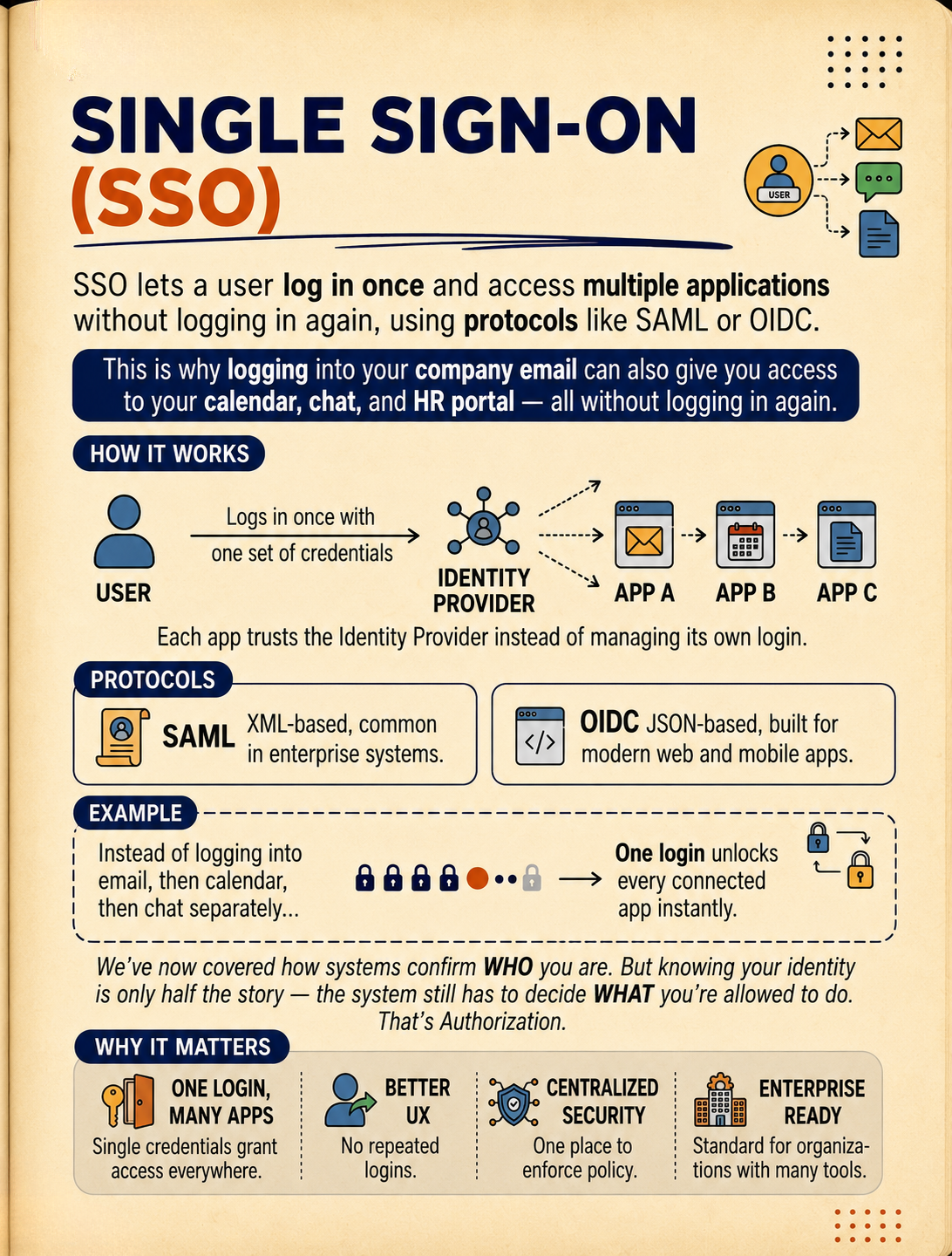
7. Single Sign-On (SSO)
Building on OAuth and OIDC, SSO solves a different problem: not "how does one app authorize access," but "how does one login work across many apps."
SSO lets a user log in once and access multiple applications without logging in again, using protocols like SAML or OIDC. This is why logging into your company email can also give you access to your calendar, chat, and HR portal — all without logging in again.
How it works:
- The user logs in once with one set of credentials
- Authentication happens at a central Identity Provider
- Each connected app (App A, App B, App C) trusts the Identity Provider instead of managing its own login
Each app trusts the Identity Provider rather than handling authentication itself.
Protocols:
- SAML — XML-based, common in enterprise systems
- OIDC — JSON-based, built for modern web and mobile apps
Why it matters:
- One login, many apps — single credentials grant access everywhere
- Better UX — no repeated logins
- Centralized security — one place to enforce policy
- Enterprise ready — the standard for organizations with many internal tools
We've now covered how systems confirm who you are. But knowing your identity is only half the story — the system still has to decide what you're allowed to do. That's authorization.
8. Authentication vs Authorization
The capstone distinction that ties everything above together — and the one most commonly confused.
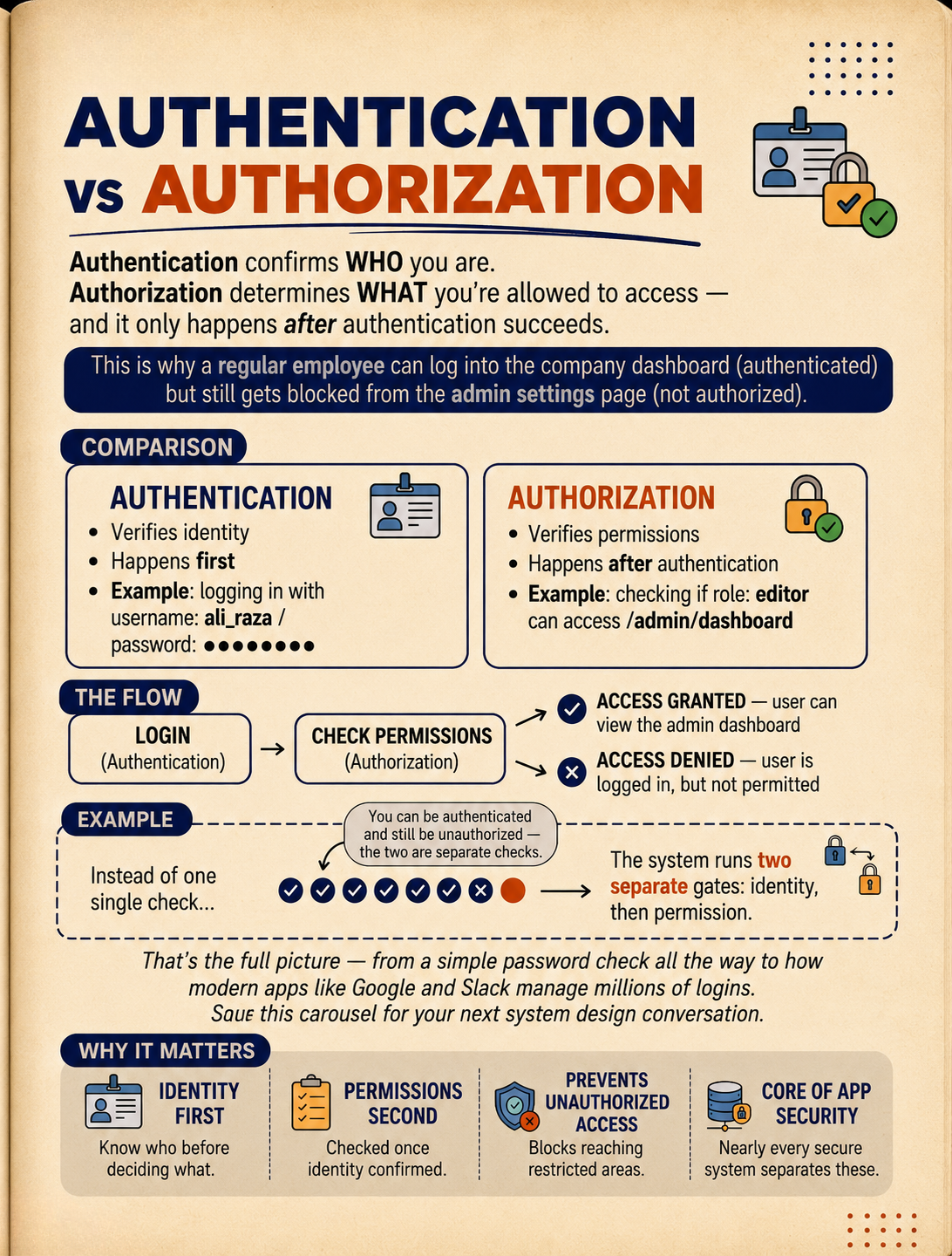
Authentication confirms WHO you are. Authorization determines WHAT you're allowed to access — and it only happens after authentication succeeds.
This is why a regular employee can log into the company dashboard (authenticated) but still gets blocked from the admin settings page (not authorized).
| Concept | Authentication | Authorization |
|---|---|---|
| Verifies | Identity | Permissions |
| Happens | First | After authentication |
| Example | Logging in with username ali_raza / password | Checking if role editor can access /admin/dashboard |
The flow: Login (Authentication) → Check Permissions (Authorization) → Access Granted (user can view the admin dashboard) or Access Denied (user is logged in, but not permitted).
The key insight: you can be authenticated and still be unauthorized — the two are separate checks. The system runs two separate gates: identity, then permission.
Why it matters:
- Identity first — know who someone is before deciding what they can do
- Permissions second — checked once identity is confirmed
- Prevents unauthorized access — blocks users from reaching restricted areas even if they're logged in
- Core of app security — nearly every secure system separates these two concerns
Bringing It All Together
That's the full picture — from a simple password check all the way to how modern apps like Google and Slack manage millions of logins. Here's the arc:
- Basic/Digest Auth and Sessions are the foundational, simplest approaches
- JWTs and Access/Refresh Tokens solve the scaling and security problems that sessions run into
- API Keys shift the conversation from human logins to service-to-service identity
- OAuth enables secure delegation to third parties without sharing passwords
- SSO extends that idea to unify login across an entire organization's tools
- Authentication vs Authorization is the conceptual foundation underneath everything else — knowing who someone is, and separately, deciding what they're allowed to do
Understanding how these pieces fit together — not just individually, but as a system — is what separates "I can build a login form" from "I can design secure, scalable auth architecture."
Save this as a reference for your next system design conversation. If you found this useful, follow along for more breakdowns on system design and backend architecture.