By @husnainizhar
Every engineer has built a file upload feature at some point — usually in an afternoon. It works great in development, feels solid in a demo, and then quietly falls apart the moment real traffic shows up.
This post walks through that exact journey: from the simplest possible upload endpoint to a production-grade architecture that can handle millions of users. If you've ever wondered why companies bother with signed URLs, message queues, and worker pools instead of just saving a file to disk — this is for you.
1. The Simple File Upload
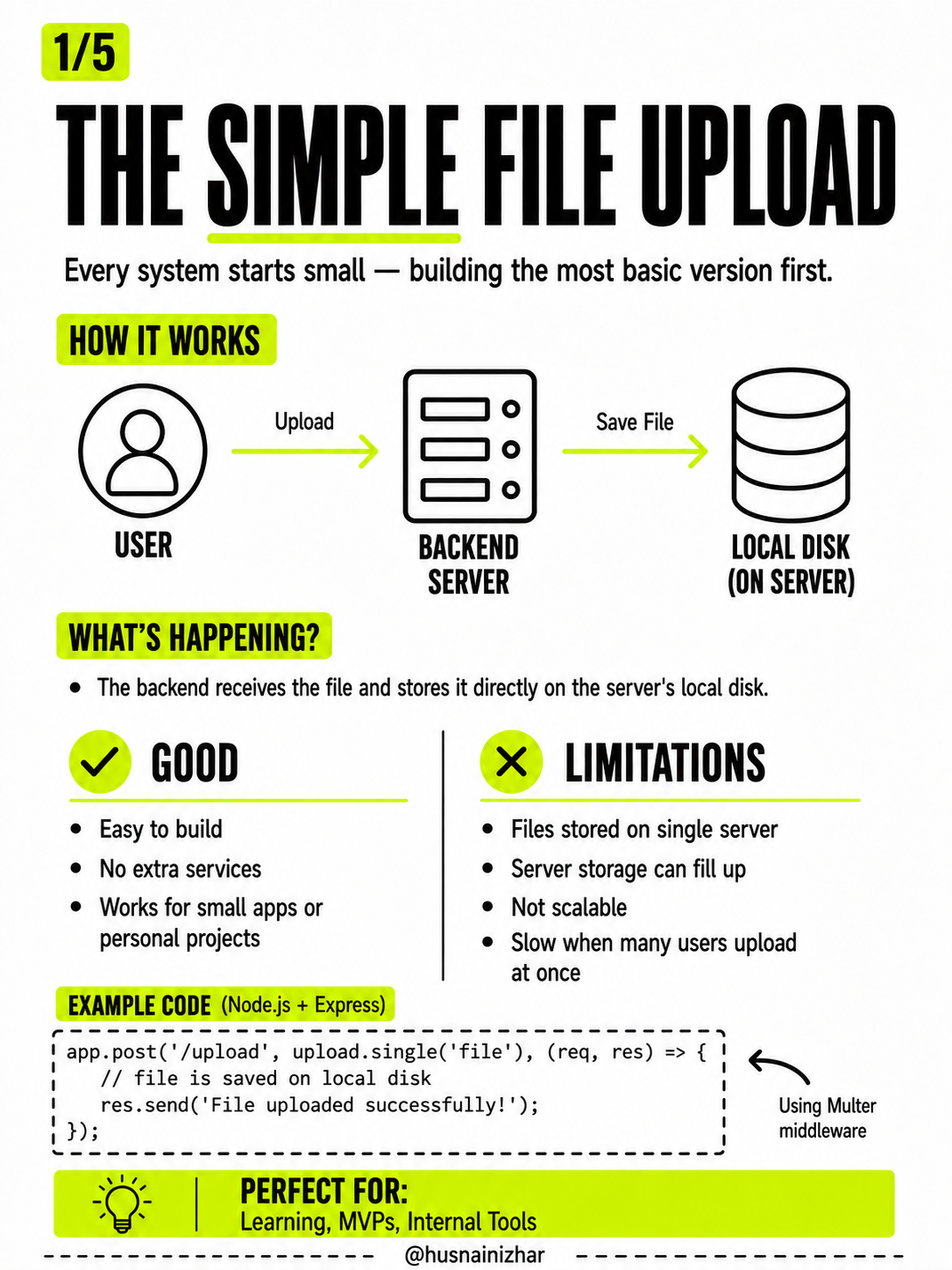
Every system starts small, and there's nothing wrong with that. The most basic version of a file upload looks like this:
How it works:
User → Upload → Backend Server → Save File → Local Disk (on server)The backend receives the file and stores it directly on the server's local disk. That's it. No extra services, no infrastructure to manage.
Example (Node.js + Express, using Multer middleware):
app.post('/upload', upload.single('file'), (req, res) => {
  // file is saved on local disk
  res.send('File uploaded successfully!');
});
What's good about it:
- Easy to build
- No extra services required
- Works fine for small apps or personal projects
Where it breaks down:
- Files are stored on a single server
- Server storage can fill up
- It doesn't scale
- Uploads get slow when many users hit it at once
This approach is perfect for learning, MVPs, and internal tools. But it was never designed to survive real-world traffic.
2. Then… 1 Million Users Arrive
What worked fine with a handful of users starts to break the moment usage grows.
When millions of users try uploading files to the same single server, four things start happening at once:
- CPU High — constant file processing overloads the CPU
- Disk Full — storing large files fills up disk space fast
- Slow Uploads — more users means longer wait times
- Server Crash — too much load eventually brings the whole server down

Reality check:
- One server has limited CPU, RAM, and disk
- Network bandwidth gets saturated
- File uploads are heavy — often ranging from megabytes to gigabytes
- When the server struggles, everyone suffers, not just the user uploading
Bottom line: the simple approach doesn't scale. You need a smarter system — one that removes heavy load from your server and distributes the work instead of piling it all in one place.
3. Move Files Out of Your Server
The first big architectural shift: stop storing files on your server at all. Let cloud storage handle it.
The new flow:
User → Request Upload URL → Backend → Returns Signed URL → Upload Directly → Cloud Storage (S3 / GCS / Azure Blob)Instead of the file passing through your server, your server simply hands the user a secure, temporary link, and the file goes straight to cloud storage.
How a signed URL works:
- The backend creates a pre-signed URL with specific permissions and an expiry time
- Only that URL can be used to upload the file, and only within the time limit
- Once uploaded, the file is stored privately and securely in the cloud
Example (using AWS S3):
// Get a pre-signed URL from backend
const { url, key } = await getSignedUploadUrl({
  fileName: 'photo.png',
  fileType: 'image/png'
});

// Upload directly to S3
await axios.put(url, file, {
  headers: { 'Content-Type': file.type }
});
Before vs. After:
| Before (Local Storage) | After (Cloud Storage) | |
|---|---|---|
| Flow | User → Server → Local Disk | User → Server → Signed URL → Cloud Storage |
| Server's job | Handles file transfer + storage (heavy!) | Only gives access. Cloud handles the heavy lifting. |
Why this matters:
- Unlimited storage
- High availability
- Faster uploads
- Lower server load
- You pay per use, not for idle capacity
Key idea: your server should never carry heavy files. It should only orchestrate the upload — not transfer it.
4. Process Files Asynchronously
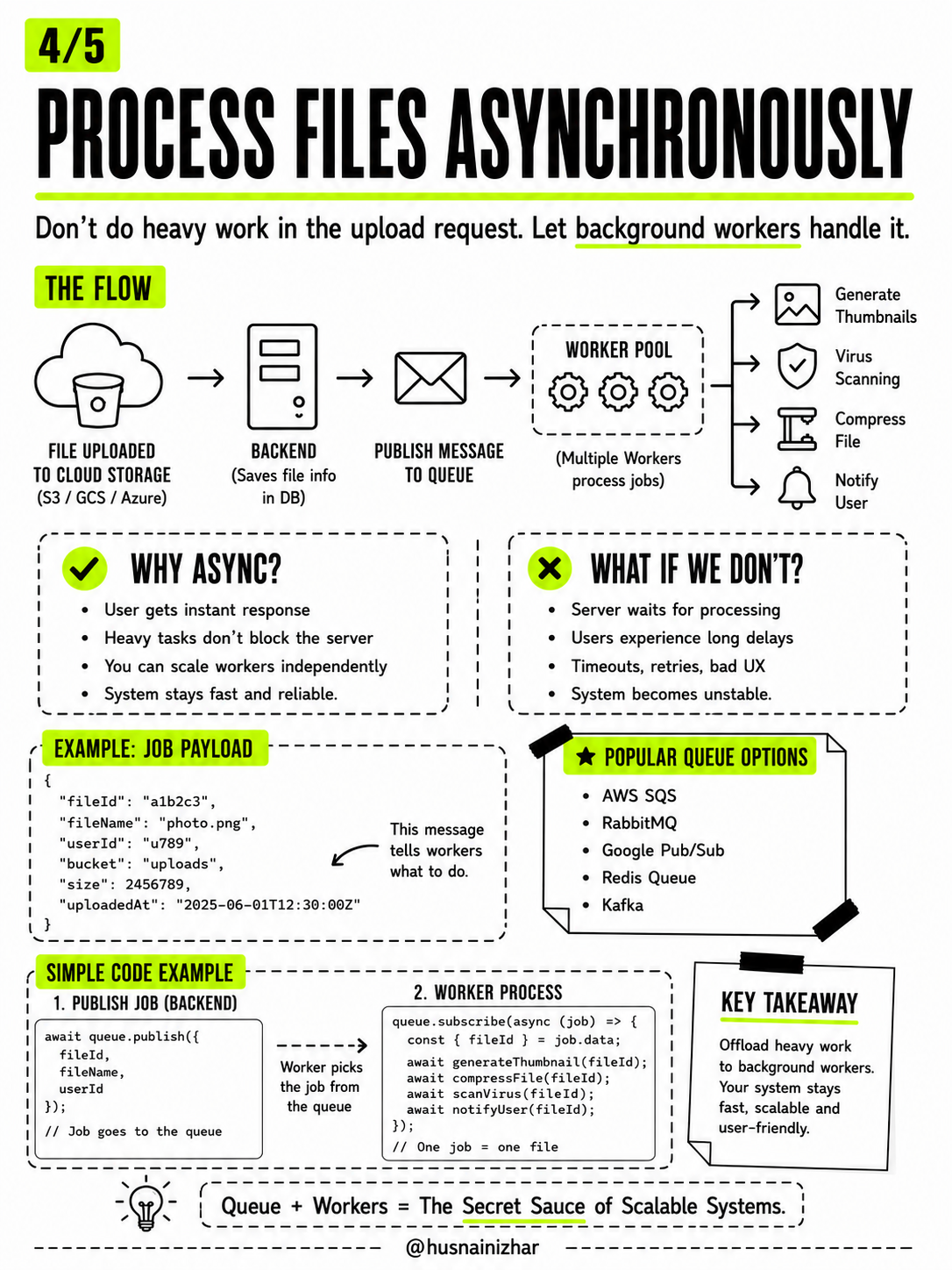
Getting files off your server solves storage — but what about everything that needs to happen to a file after it's uploaded? Generating thumbnails, scanning for viruses, compressing, notifying the user? Doing that inside the upload request is a trap. Let background workers handle it instead.
The flow:
File Uploaded to Cloud Storage → Backend (saves file info to DB) → Publish Message to Queue → Worker Pool → [Generate Thumbnails | Virus Scanning | Compress File | Notify User]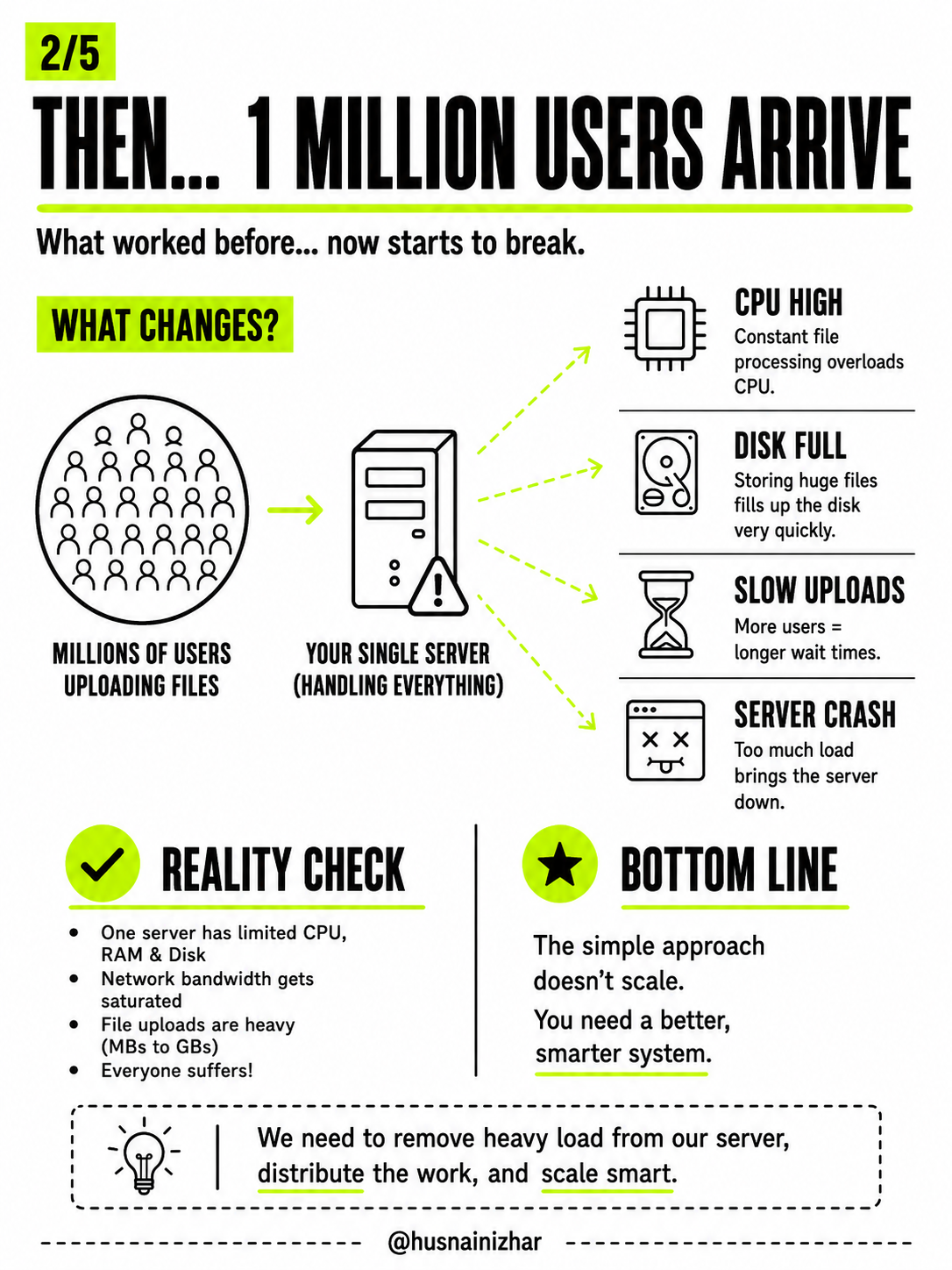
Why go async?
- The user gets an instant response
- Heavy tasks no longer block the server
- You can scale workers independently of your main app
- The system stays fast and reliable
What happens if you don't?
- The server sits there waiting for processing to finish
- Users experience long delays
- You get timeouts, retries, and a bad user experience
- The whole system becomes unstable under load
Example job payload sent to the queue:
{
  "fileId": "a1b2c3",
  "fileName": "photo.png",
  "userId": "u789",
  "bucket": "uploads",
  "size": 2456789,
  "uploadedAt": "2025-06-01T12:30:00Z"
}
Publishing the job (backend):
await queue.publish({
  fileId,
  fileName,
  userId
});
// Job goes to the queue
Processing the job (worker):
queue.subscribe(async (job) => {
  const { fileId } = job.data;
  await generateThumbnail(fileId);
  await compressFile(fileId);
  await scanVirus(fileId);
  await notifyUser(fileId);
});
// One job = one file
Popular queue options: AWS SQS, RabbitMQ, Google Pub/Sub, Redis Queue, Kafka.
Key takeaway: offload heavy work to background workers. Your system stays fast, scalable, and user-friendly. Queue + workers is the secret sauce of scalable systems.
5. Production-Ready Architecture
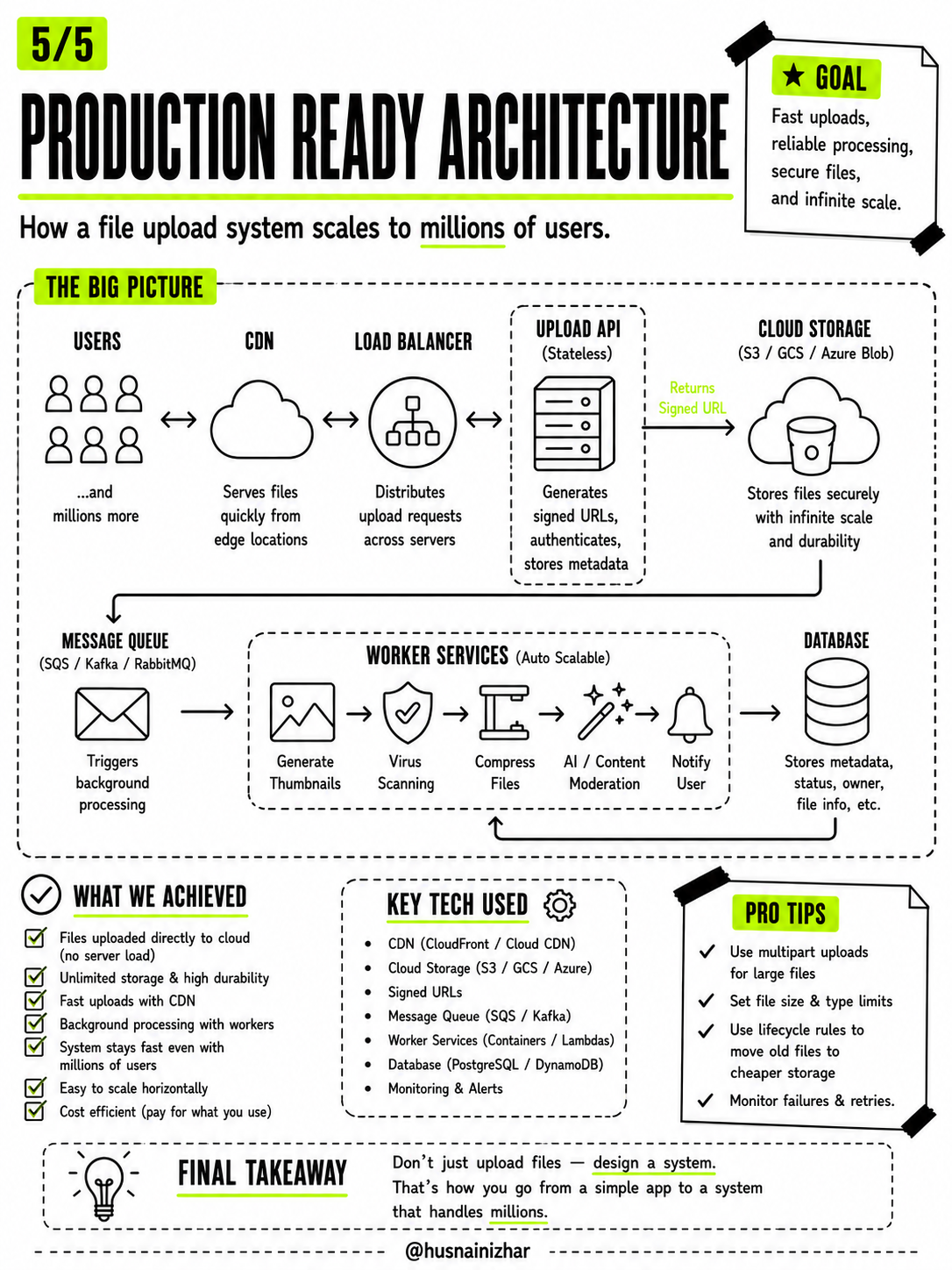
Putting it all together, here's how a file upload system actually looks when it's built to handle millions of users.
The big picture:
Users ↔ CDN ↔ Load Balancer ↔ Upload API (Stateless) → Cloud Storage (returns Signed URL)
                                                              ↓
                                                        Message Queue
                                                              ↓
                                          Worker Services (Generate Thumbnails →
                                          Virus Scanning → Compress Files →
                                          AI / Content Moderation → Notify User)
                                                              ↓
                                                          Database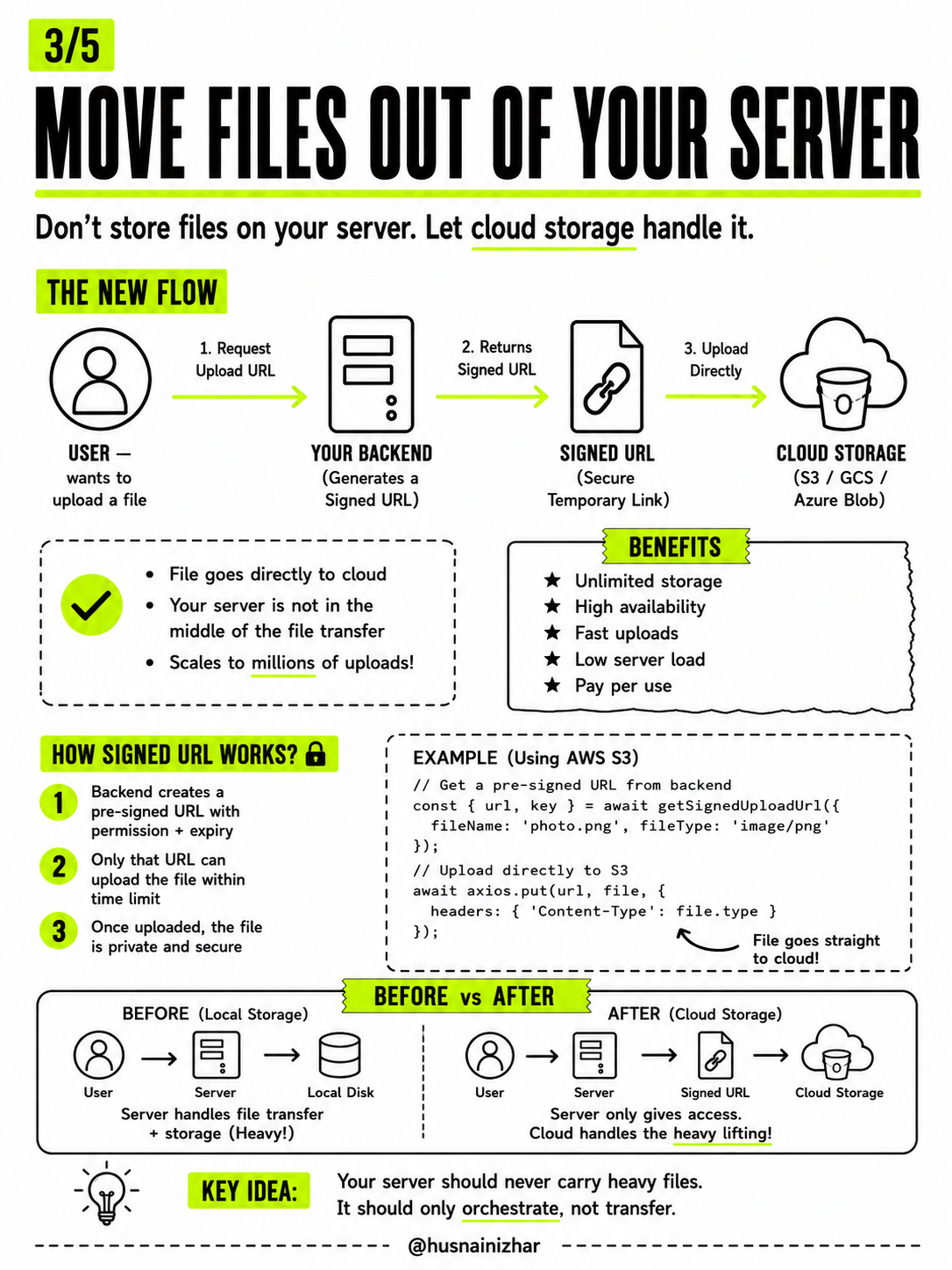
- CDN — serves files quickly from edge locations close to the user
- Load Balancer — distributes upload requests across multiple servers
- Upload API (stateless) — generates signed URLs, authenticates requests, stores metadata
- Cloud Storage — stores files securely with infinite scale and durability
- Message Queue — triggers background processing
- Worker Services (auto-scalable) — handle thumbnails, virus scanning, compression, moderation, notifications
- Database — stores metadata, status, ownership, and file info
What this architecture achieves:
- Files upload directly to the cloud, with no server load
- Unlimited storage and high durability
- Fast uploads thanks to the CDN
- Background processing that doesn't block users
- A system that stays fast even with millions of users
- Easy horizontal scaling
- Cost efficiency — you pay for what you actually use
Key tech stack:
- CDN (CloudFront / Cloud CDN)
- Cloud Storage (S3 / GCS / Azure Blob)
- Signed URLs
- Message Queue (SQS / Kafka)
- Worker Services (Containers / Lambdas)
- Database (PostgreSQL / DynamoDB)
- Monitoring & Alerts
A few pro tips:
- Use multipart uploads for large files
- Set file size and type limits up front
- Use lifecycle rules to move old files to cheaper storage tiers
- Monitor failures and build in retries
Final Takeaway
Don't just upload files — design a system.
Going from a simple upload endpoint to a production-ready architecture isn't about adding complexity for its own sake. Each step — moving files off the server, going async, distributing the load — solves a specific, real problem that shows up as soon as your app has actual users.
That's the difference between an app that works in a demo and a system that handles millions.
Found this useful? Follow @husnainizhar for more deep dives into backend architecture and system design.