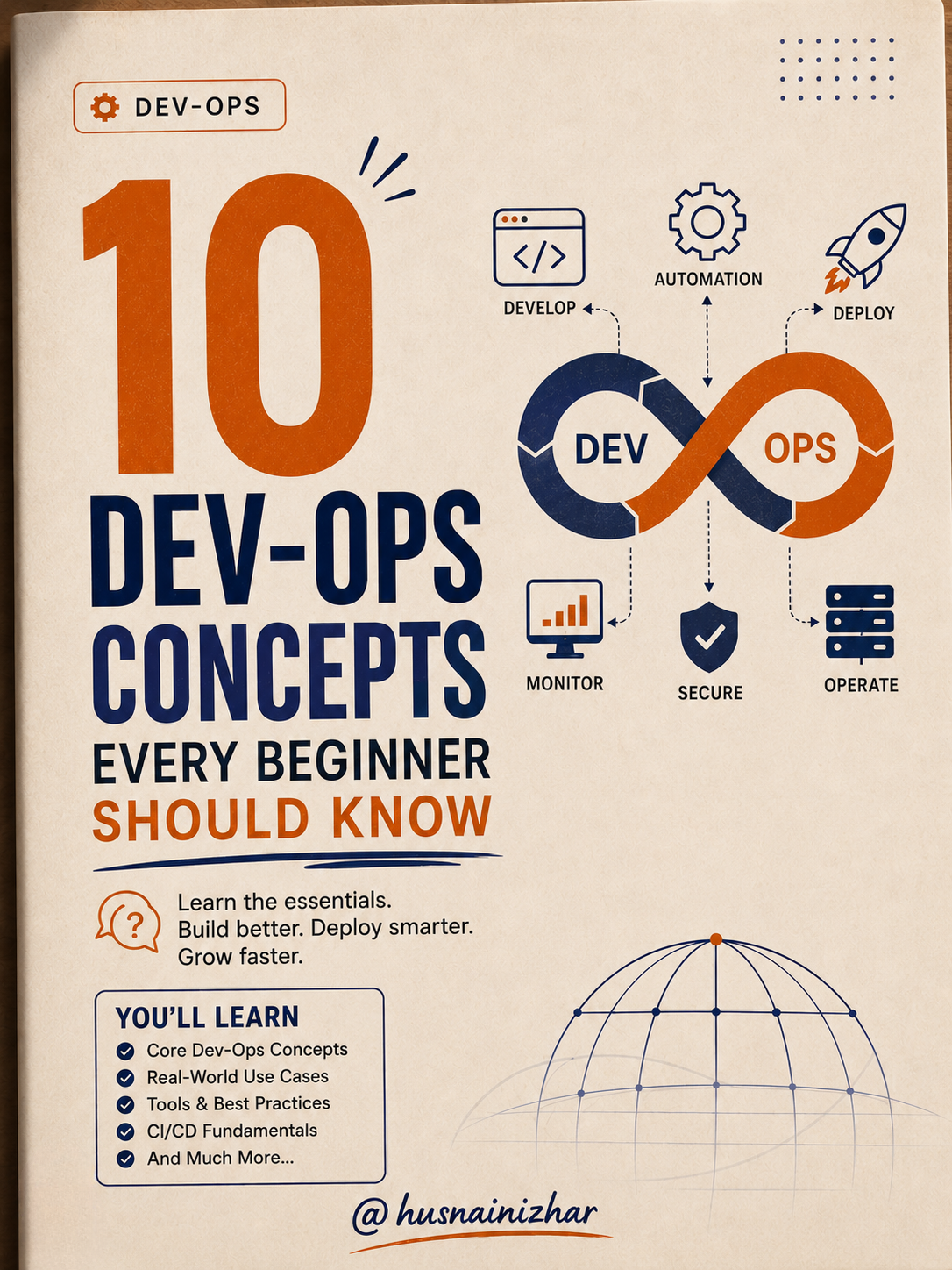
10 DevOps Concepts Every Developer Should Know
If you've ever sat in a system design interview or an architecture review and nodded along while terms like "API Gateway," "Canary Deployment," or "Horizontal Scaling" flew past you — you're not alone. These concepts sound complex, but the ideas behind them are refreshingly simple once broken down.
I've spent years designing and reviewing distributed systems, and I keep coming back to the same 10 concepts as the foundation for understanding how modern software actually runs in production. This post breaks each one down — no jargon, no fluff.
1. API Gateway: The Smart Door Between Clients and Microservices
An API Gateway is a reverse proxy that sits between clients and your backend services. Instead of clients talking directly to dozens of microservices, they talk to one gateway, which handles routing, security, and policy enforcement.
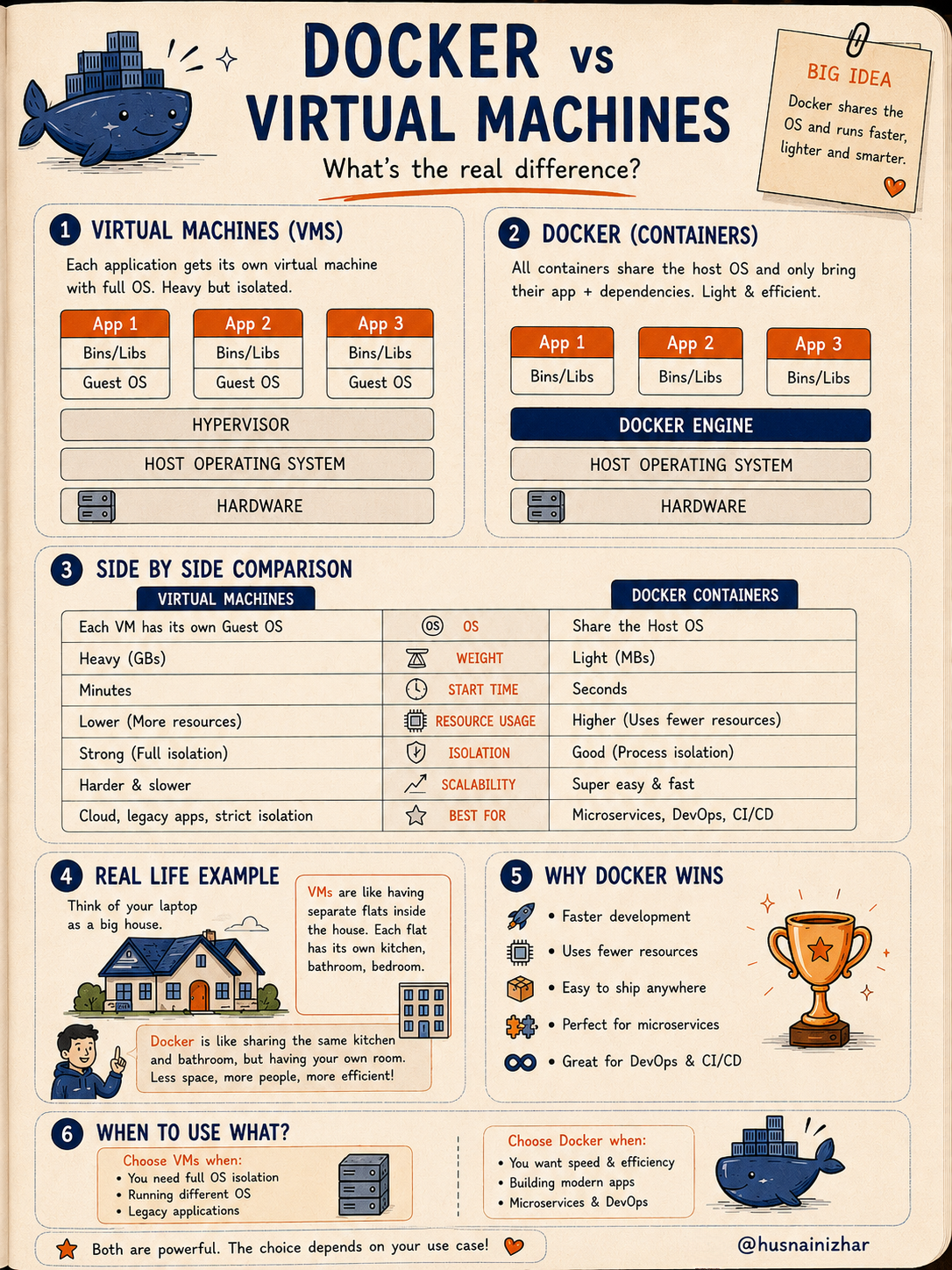
Why you need it:
- Security — centralized authentication, authorization, and rate limiting
- Routing — sends requests to the correct microservice
- Request/response management — transforms, validates, compresses, or aggregates data
- Monitoring & logging — one place to observe all API traffic
- Performance — caching, throttling, and other optimizations
How it works: A client sends a request → the gateway authenticates it, checks rate limits, validates it, and logs it → routes it to the right microservice → returns the response.
Popular tools: Kong, Amazon API Gateway, Azure API Management, Google Cloud Endpoints, NGINX, Traefik.
Think of it as a smart security guard for your APIs — it checks who you are, what you want, and sends you to the right place, safely and efficiently.
2. CI vs CD: The DevOps Duo That Ships Software Faster
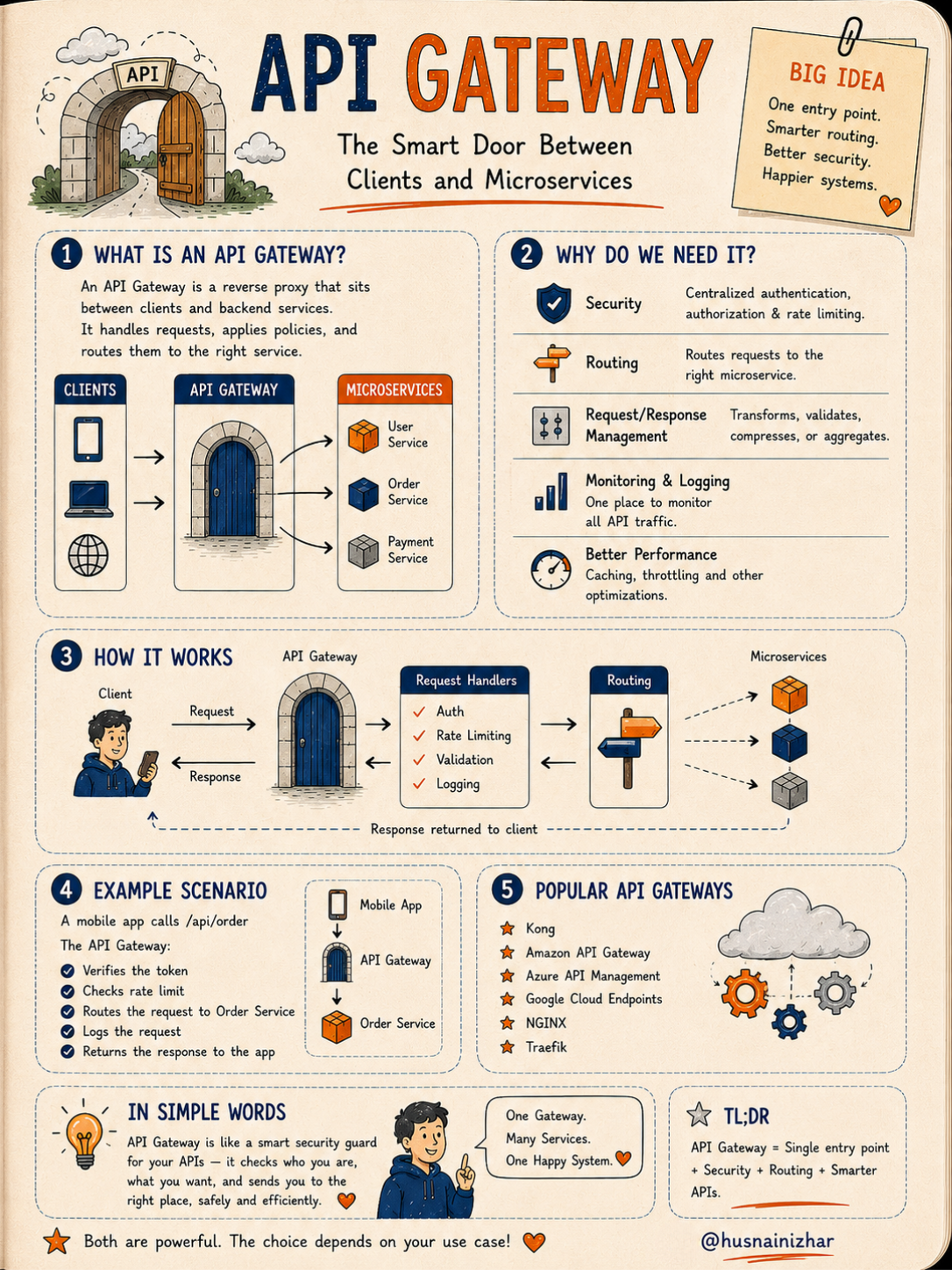
Continuous Integration (CI) is the practice of frequently merging code changes into a shared repository. Every push triggers an automated build and test run, catching bugs early.
Continuous Delivery/Deployment (CD) ensures that once code passes CI, it's packaged, deployed to staging, and — after approval or automatically — released to production.
| Aspect | CI | CD |
|---|---|---|
| Focus | Integrating code | Delivering code |
| Trigger | After code commit | After successful build & test |
| What it does | Build + Test | Build + Test + Release |
| End point | Stops at tested code | Goes all the way to production |
The takeaway: CI builds confidence in your code. CD delivers that value to users. Together, they let teams ship faster without breaking things.
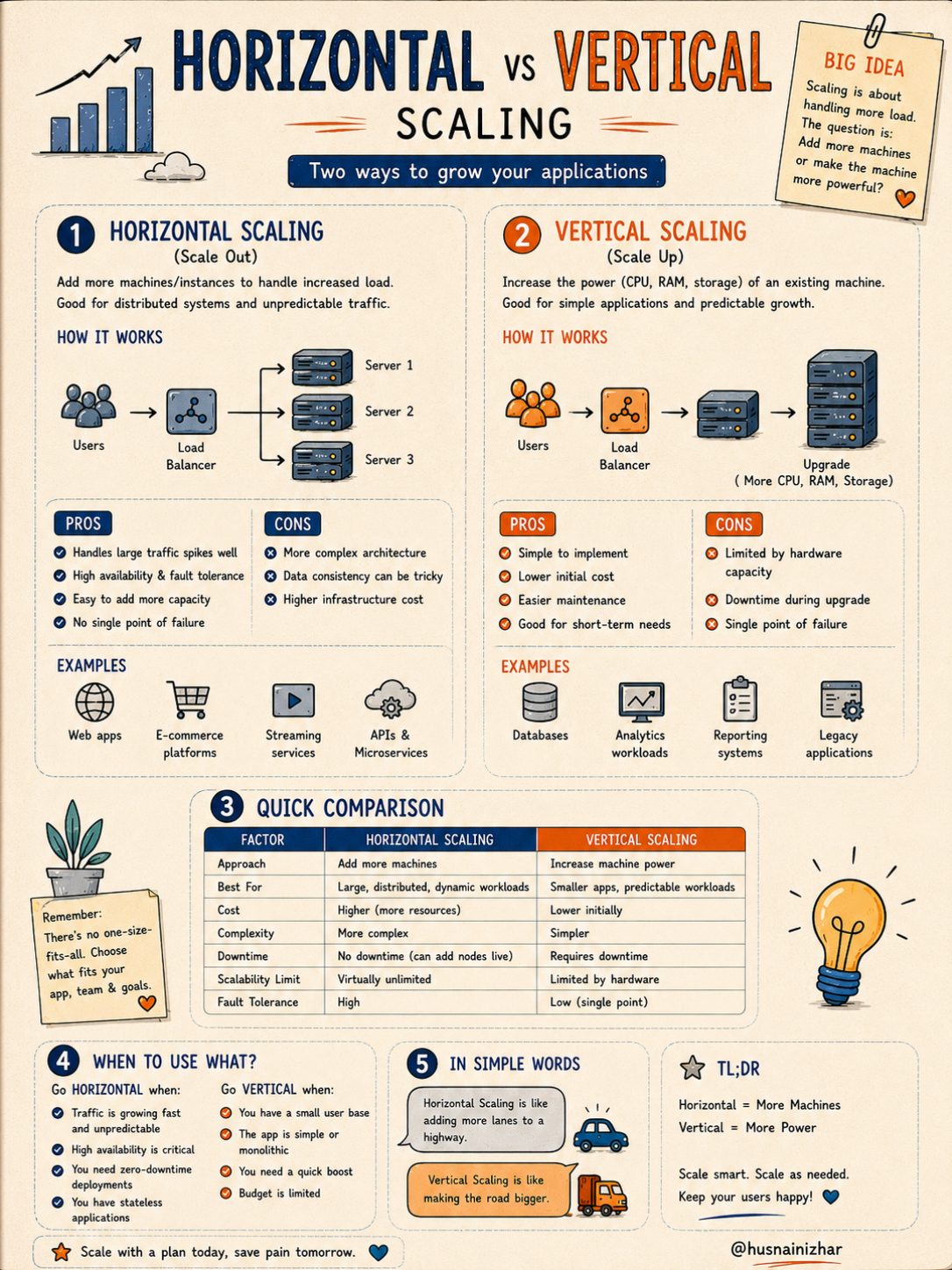
3. CDN: Bringing Content Closer to Your Users
A Content Delivery Network (CDN) is a network of servers distributed globally that deliver content based on the user's location, reducing latency.
How it works:
- A user requests content (image, video, CSS file)
- The CDN finds the nearest edge server
- If the content is cached there, it's delivered instantly
- If not, the CDN fetches it from the origin server, caches it, and delivers it — next time it's served from cache
Without a CDN: every request hits the origin server, causing high latency and possible overload for users far from that server.
With a CDN: requests are served from the nearest edge server, reducing latency and load on the origin.
Popular providers: Cloudflare, Amazon CloudFront, Akamai, Fastly, Google Cloud CDN.
In short: less distance, more speed.
4. Kubernetes: Orchestrating Containers at Scale
Kubernetes (K8s) is an open-source platform that automates the deployment, scaling, and management of containerized applications.
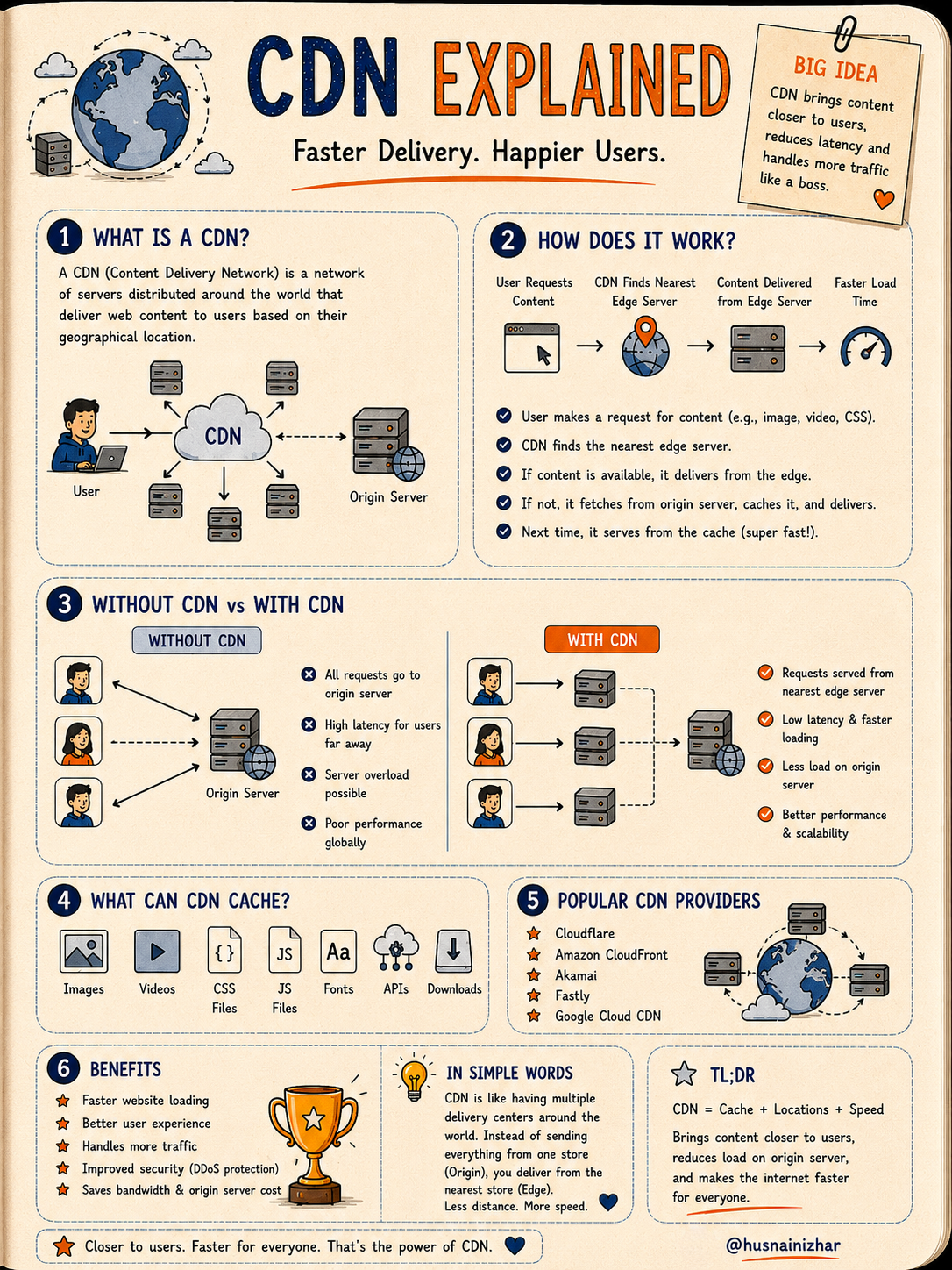
Why teams use it:
- Auto scaling — scale up or down based on demand
- Self-healing — restarts or replaces failed containers automatically
- Load balancing — distributes traffic evenly
- Rolling updates — update apps with zero downtime
- Resource management — efficient use of CPU, memory, and storage
Core architecture:
- Control Plane (API Server, Scheduler, Controller Manager, etcd) — the brain that manages the cluster
- Worker Nodes (Kubelet, Kube-proxy, Container Runtime) — where your applications actually run
Building blocks: Pods, ReplicaSets, Deployments, Services, Namespaces, ConfigMaps & Secrets.
Kubernetes is like a smart operations manager for your containers — you focus on building the app, and K8s handles deployment, scaling, and healing.
5. DNS Resolution: The Internet's Phonebook
DNS (Domain Name System) translates human-friendly domain names (like example.com) into IP addresses computers use to communicate.
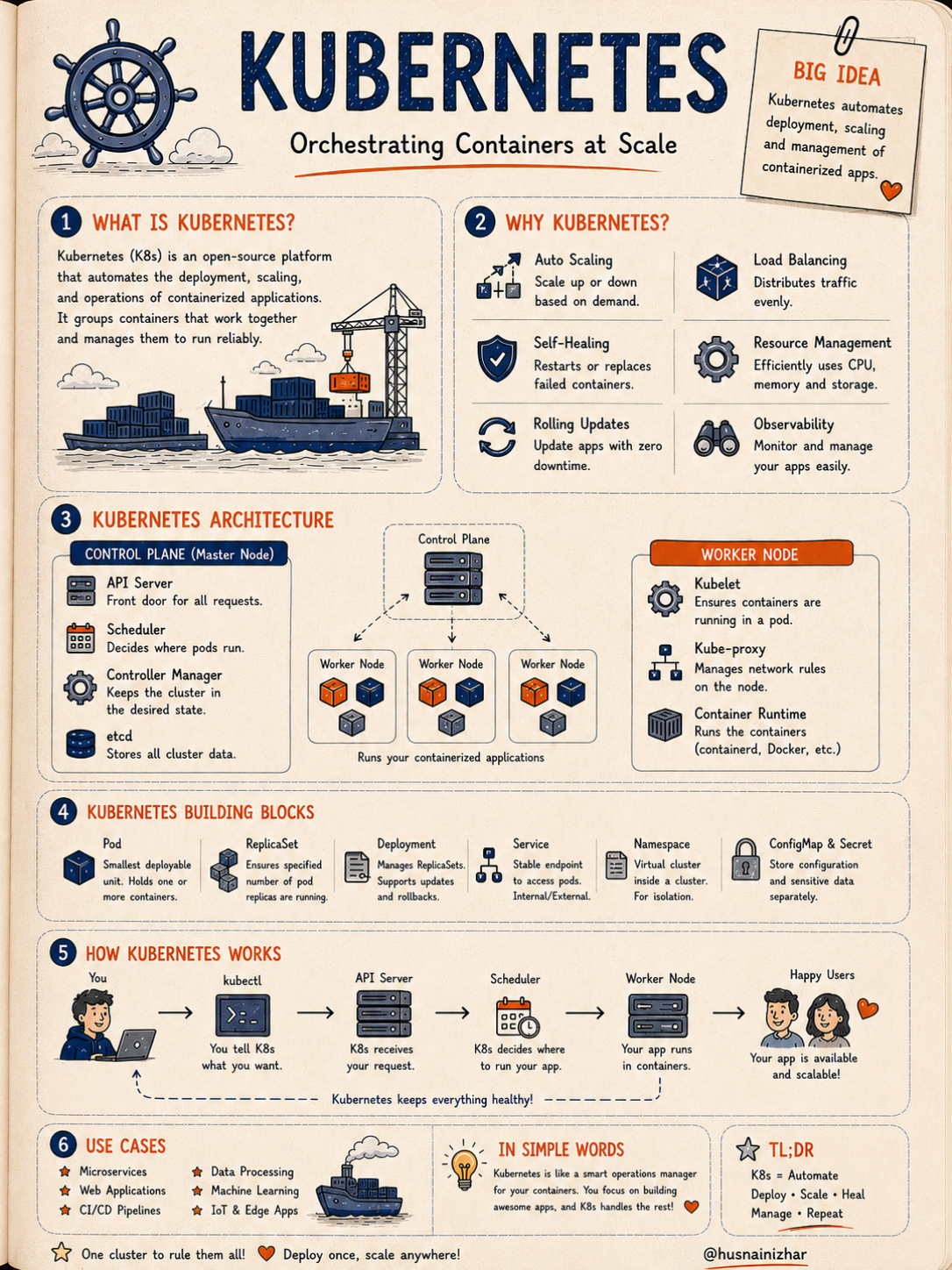
The hierarchy:
- Root servers — top of the hierarchy, point to TLD servers
- TLD servers (.com, .org, .net) — know which authoritative server handles the domain
- Authoritative nameservers — hold the actual DNS records
- Records (A, AAAA, CNAME, MX, TXT) — map the domain to the correct IP address
The resolution process, step by step: your browser asks a recursive resolver → which asks the root server → then the TLD server → then the authoritative nameserver → which returns the IP address → your browser connects and the site loads.
Common record types:
- A — maps a domain to an IPv4 address
- AAAA — maps to an IPv6 address
- CNAME — alias of another domain
- MX — mail routing
- TXT — verification and SPF records
Caching: results are cached at multiple levels (browser, OS, router, ISP) to speed things up, governed by TTL (Time to Live).
You type a name. DNS finds the address. The connection happens. The internet works.
6. Horizontal vs Vertical Scaling: Two Ways to Grow Your Application
Horizontal Scaling (Scale Out) means adding more machines or instances to handle increased load. It's ideal for distributed systems and unpredictable traffic.
Vertical Scaling (Scale Up) means increasing the power (CPU, RAM, storage) of an existing machine. It's simpler but limited by hardware capacity.
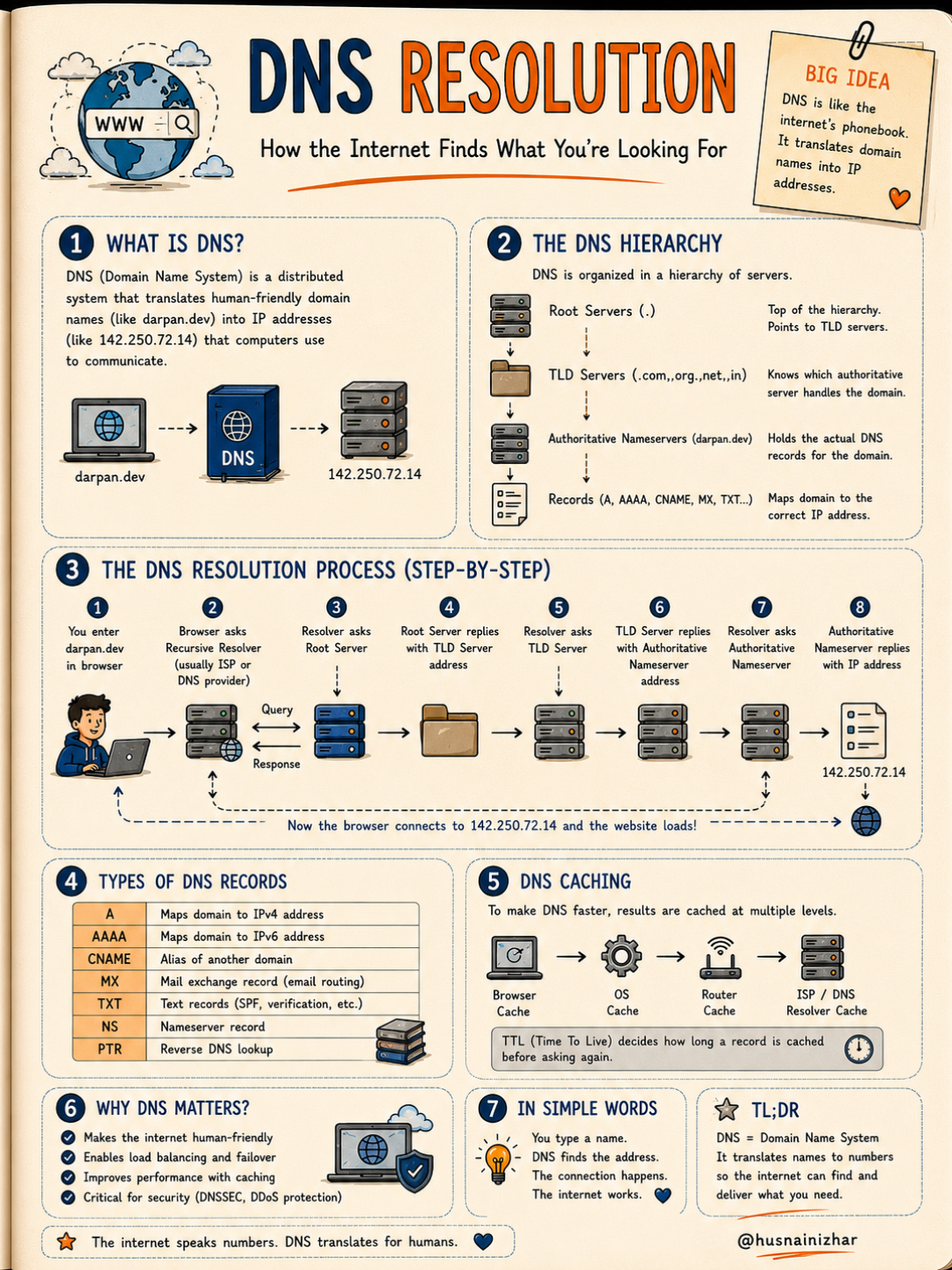
| Factor | Horizontal | Vertical |
|---|---|---|
| Approach | Add more machines | Increase machine power |
| Best for | Large, distributed workloads | Smaller, predictable workloads |
| Downtime | None (can add nodes live) | Requires downtime |
| Scalability limit | Virtually unlimited | Limited by hardware |
| Fault tolerance | High | Low (single point of failure) |
When to go horizontal: growing/unpredictable traffic, high availability requirements, zero-downtime deployments, stateless applications.
When to go vertical: small user base, simple/monolithic apps, quick performance boosts, limited budget.
Horizontal scaling is like adding more lanes to a highway. Vertical scaling is like making the road bigger.
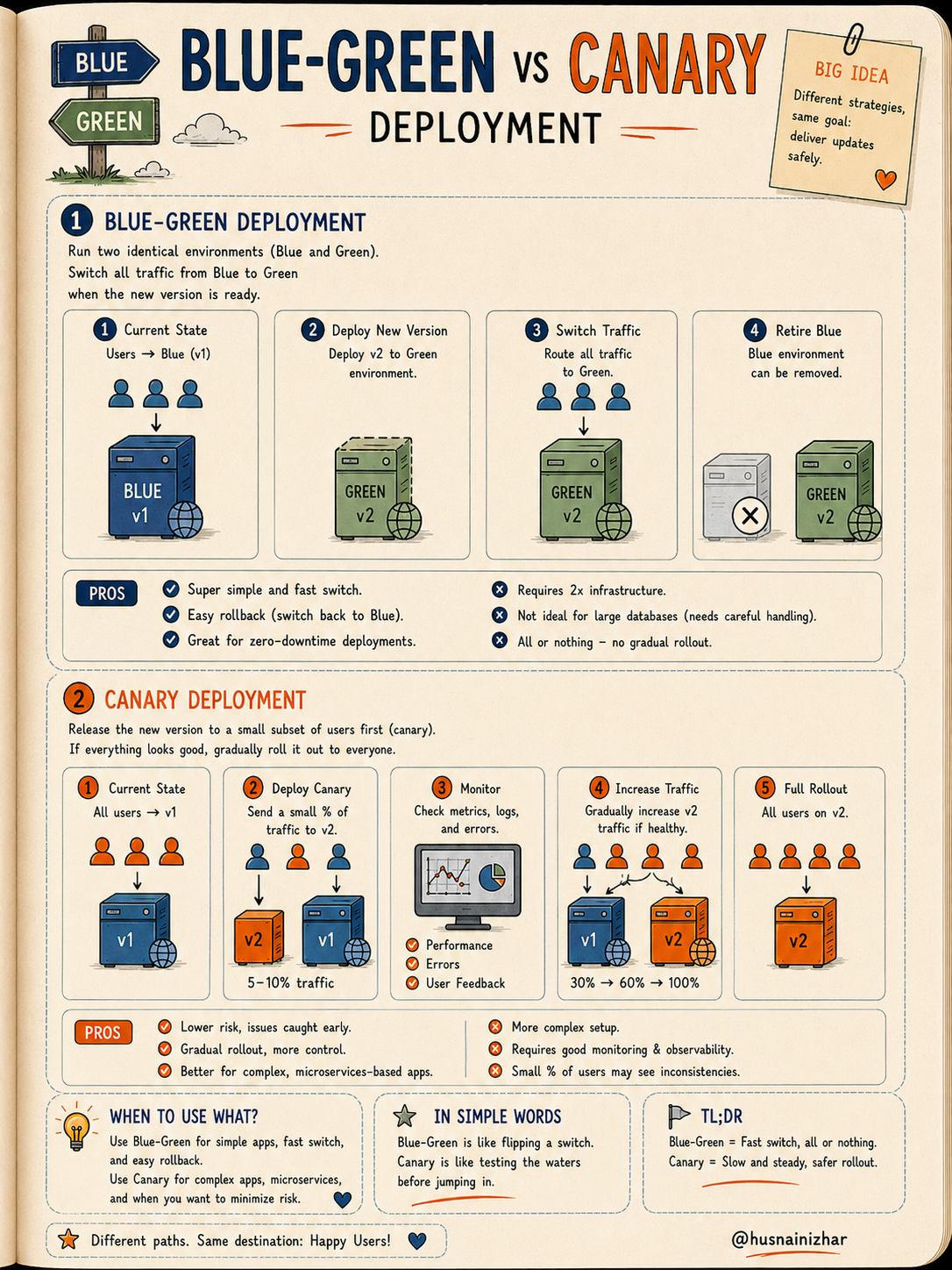
7. Blue-Green vs Canary Deployment: Shipping Updates Safely
Blue-Green Deployment runs two identical environments. Traffic switches entirely from the old version (Blue) to the new version (Green) once it's ready.
- ✅ Fast switch, easy rollback
- ❌ Requires double infrastructure, all-or-nothing rollout
Canary Deployment releases the new version to a small subset of users first. If metrics look healthy, traffic gradually increases until the rollout is complete.
- ✅ Lower risk, gradual rollout, better for complex microservices
- ❌ More complex setup, requires solid monitoring
When to use which: Blue-Green works well for simple apps needing a fast, clean switch. Canary is better suited for complex, microservices-based systems where minimizing risk matters more than speed.
Blue-Green is like flipping a switch. Canary is like testing the water before jumping in.
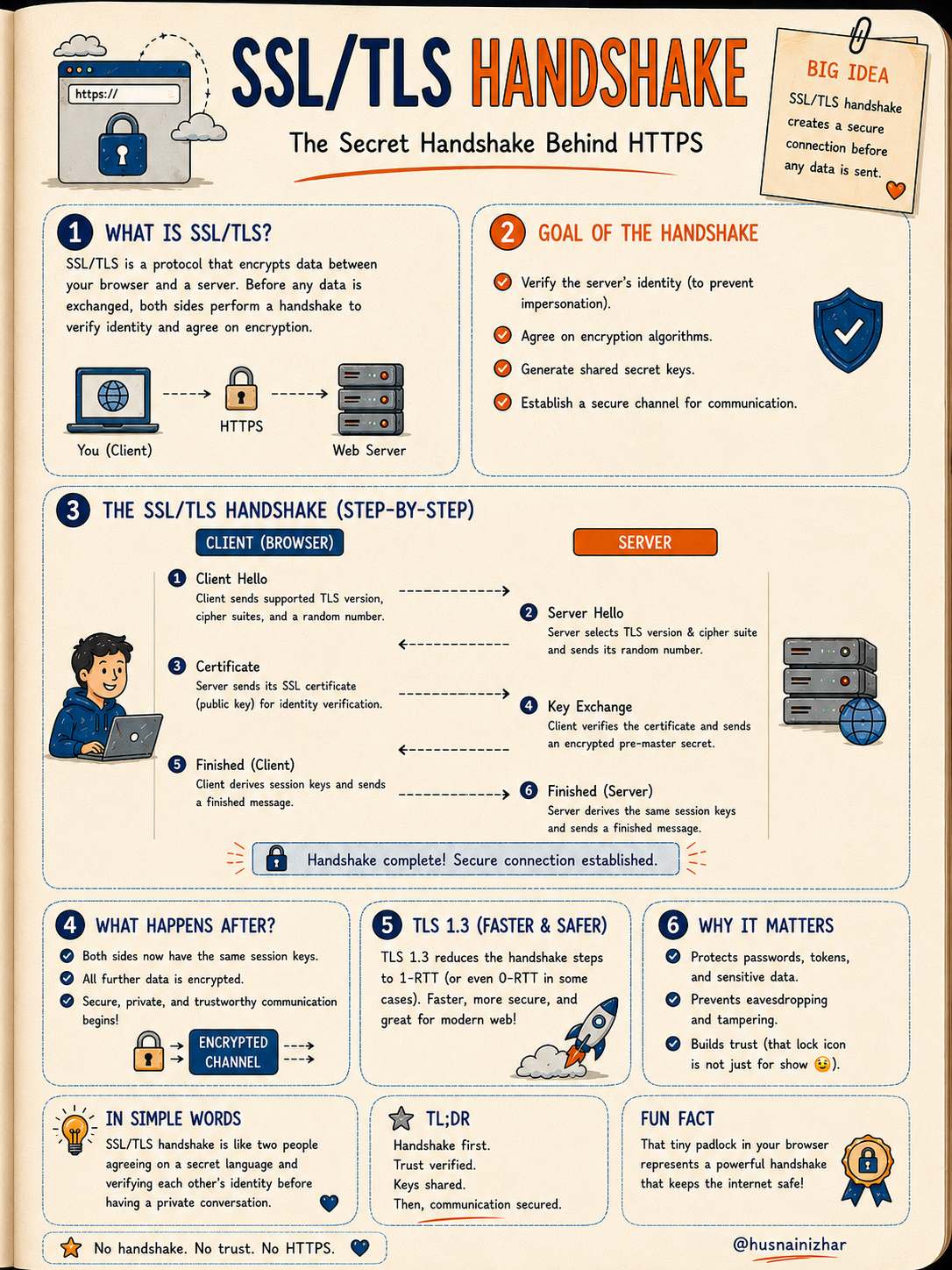
8. SSL/TLS Handshake: The Secret Behind Every HTTPS Connection
Before any data is exchanged over HTTPS, the client and server perform a handshake to verify identity and agree on encryption.
The handshake, step by step:
- Client Hello — client sends supported TLS version, cipher suites, and a random number
- Server Hello — server selects the TLS version and cipher suite, sends its own random number
- Certificate — server sends its SSL certificate for identity verification
- Key Exchange — client verifies the certificate and sends an encrypted pre-master secret
- Finished (Client) — client derives session keys and sends a finished message
- Finished (Server) — server derives the same session keys and confirms
Once complete, both sides share the same session keys, and all further communication is encrypted.
TLS 1.3 reduces this to a single round trip (1-RTT, or even 0-RTT in some cases), making the modern web faster and more secure.
No handshake, no trust, no HTTPS.
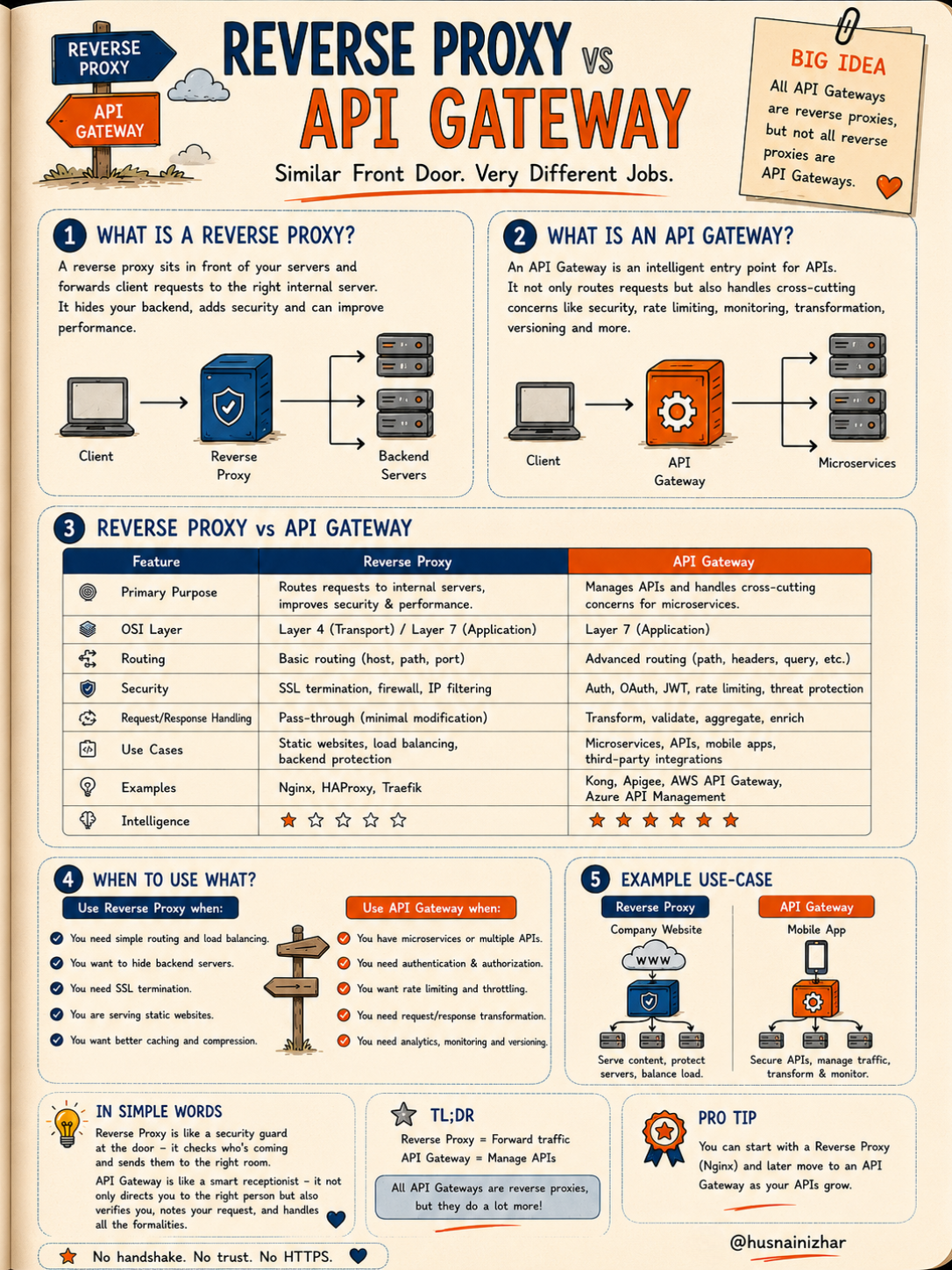
9. Reverse Proxy vs API Gateway: Similar Front Door, Very Different Jobs
A Reverse Proxy sits in front of your servers, forwarding client requests to the right internal server. It hides your backend, improves security, and boosts performance — but its intelligence is limited.
An API Gateway is a smarter entry point for APIs. It doesn't just route requests — it handles authentication, rate limiting, transformation, and monitoring.
| Feature | Reverse Proxy | API Gateway |
|---|---|---|
| Primary purpose | Route requests, improve security/performance | Manage APIs, handle cross-cutting concerns |
| Routing | Basic (host, path, port) | Advanced (path, headers, query, etc.) |
| Security | SSL termination, firewall, IP filtering | Auth, OAuth, JWT, rate limiting |
| Examples | Nginx, HAProxy, Traefik | Kong, Apigee, AWS API Gateway |
The key insight: all API Gateways are reverse proxies, but not all reverse proxies are API Gateways.
Pro tip: many teams start with a simple reverse proxy (like Nginx) and evolve into a full API Gateway as their number of APIs and microservices grows.
10. Docker vs Virtual Machines: What's the Real Difference?
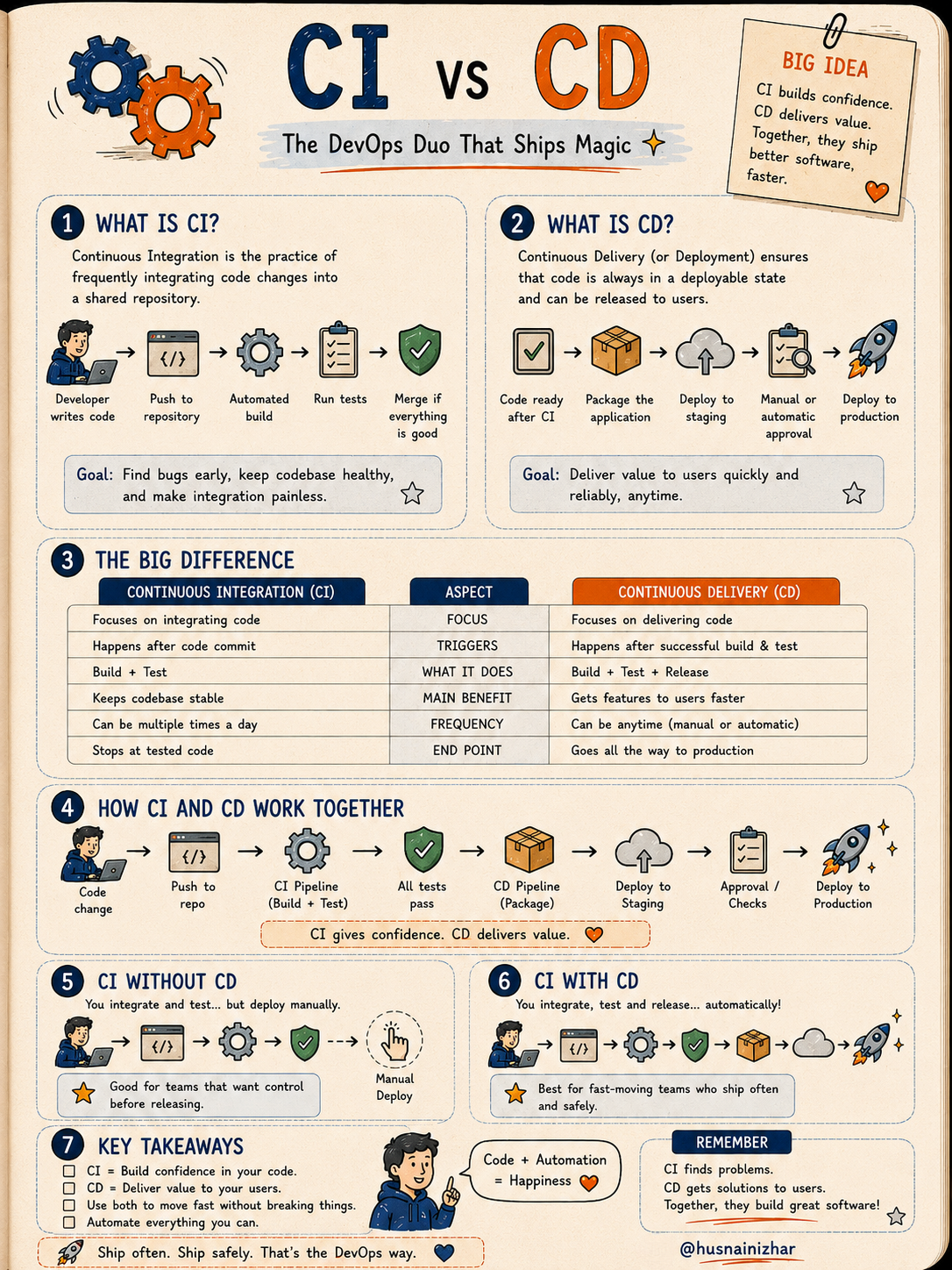
Virtual Machines (VMs) give each application its own full guest OS on top of a hypervisor. They're heavy but fully isolated.
Docker (Containers) share the host OS and only package the app plus its dependencies. They're lightweight and efficient.
| Virtual Machines | Docker Containers | |
|---|---|---|
| OS | Each VM has its own guest OS | Share the host OS |
| Weight | Heavy (GBs) | Light (MBs) |
| Start time | Minutes | Seconds |
| Isolation | Strong (full isolation) | Good (process isolation) |
| Best for | Legacy apps, strict isolation | Microservices, DevOps, CI/CD |
A simple analogy: think of your laptop as a big house. VMs are like separate flats — each with its own kitchen, bathroom, and bedroom. Docker is like sharing the same kitchen and bathroom, but having your own room — less space, more people, more efficient.
Choose VMs when: you need full OS isolation, are running different operating systems, or supporting legacy applications.
Choose Docker when: you want speed and efficiency, are building modern applications, or working with microservices and CI/CD pipelines.
Final Thoughts
None of these concepts are complicated in isolation — the challenge is usually that they're explained in overly technical language, or taught in silos without connecting them to the bigger picture. In practice, most production systems combine several of these ideas at once: an API Gateway routing to microservices running in Kubernetes containers, deployed via a CI/CD pipeline using Canary releases, all served faster to users through a CDN.

Understanding how these pieces fit together is what separates developers who can write code from architects who can design systems.
If you found this useful, save it for your next system design conversation, share it with your team, and follow along for more breakdowns like this one.