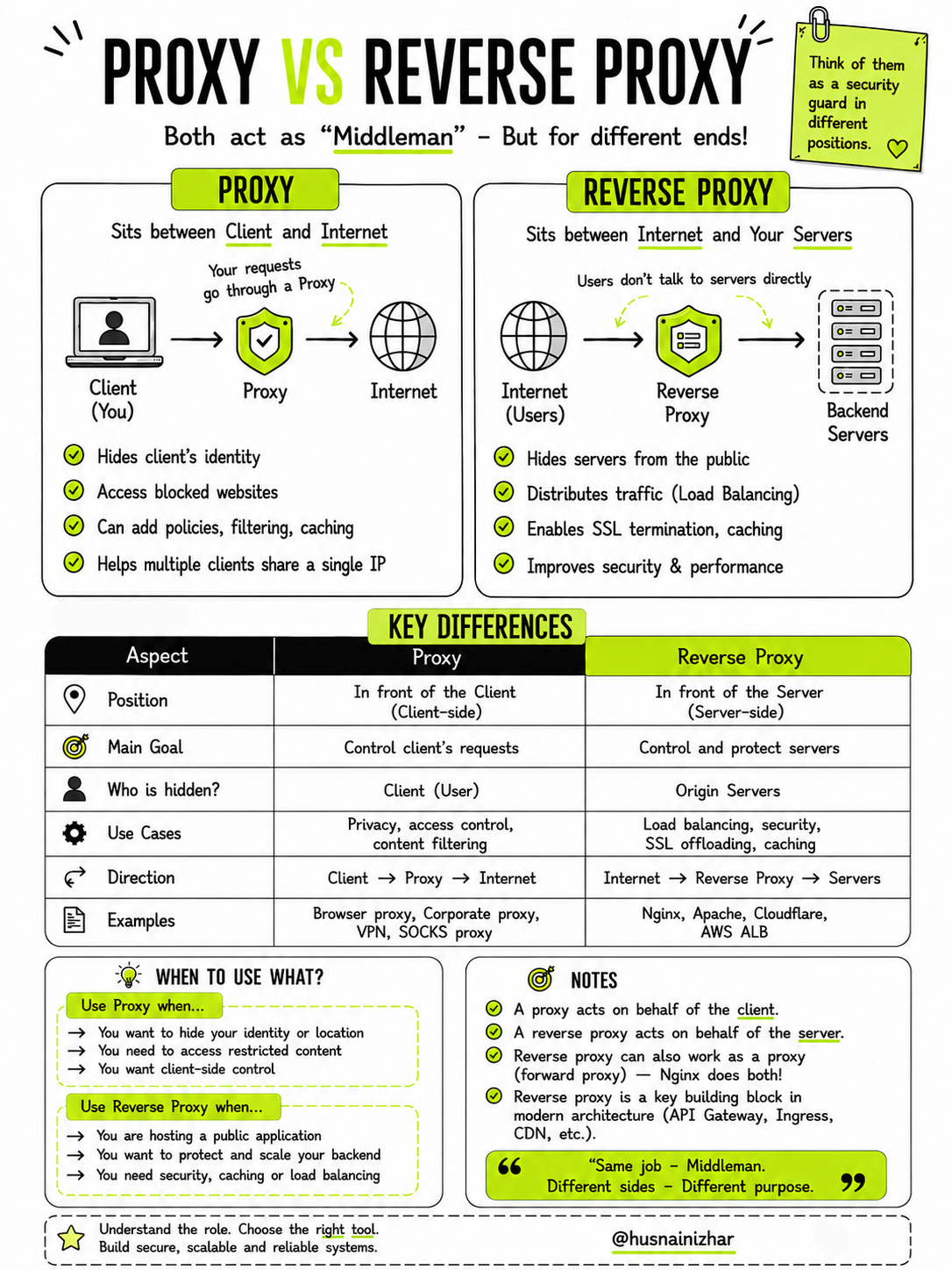
Proxy vs Reverse Proxy: Understanding the Key Differences
Both a proxy and a reverse proxy act as a "middleman" in network communication — but they sit on opposite sides of the conversation, serving completely different purposes. If you've ever mixed them up, you're not alone. This guide breaks down exactly what each one does, how they differ, and when to use which.
Think of them as a security guard stationed at different positions — one guarding the client, the other guarding the server.
What Is a Proxy?
A proxy (also called a forward proxy) sits between the client and the internet. When you make a request, it doesn't go directly to the destination server — it first passes through the proxy.
Client (You) → Proxy → InternetWhat a Proxy Does
- Hides the client's identity — the destination server sees the proxy's IP, not yours
- Allows access to blocked or restricted websites — useful for bypassing geo-restrictions or firewalls
- Adds policies, filtering, and caching — organizations use this to enforce content rules or speed up repeated requests
- Lets multiple clients share a single IP address — common in corporate networks
Common Examples
- Browser proxies
- Corporate network proxies
- VPNs
- SOCKS proxies
In short: a proxy acts on behalf of the client.
What Is a Reverse Proxy?
A reverse proxy sits between the internet (users) and your backend servers. Instead of protecting the client, it protects and manages the server. Users never talk to your backend servers directly — every request is routed through the reverse proxy first.
Internet (Users) → Reverse Proxy → Backend ServersWhat a Reverse Proxy Does
- Hides your servers from the public — the origin server's real location and identity stay private
- Distributes traffic (load balancing) — spreads incoming requests across multiple servers to prevent overload
- Enables SSL termination and caching — handles encryption/decryption and stores frequently requested content
- Improves security and performance — shields the backend from direct exposure to potentially malicious traffic
Common Examples
- Nginx
- Apache
- Cloudflare
- AWS Application Load Balancer (ALB)
In short: a reverse proxy acts on behalf of the server.
Key Differences at a Glance
| Aspect | Proxy | Reverse Proxy |
|---|---|---|
| Position | In front of the client (client-side) | In front of the server (server-side) |
| Main Goal | Control the client's requests | Control and protect the servers |
| Who Is Hidden? | Client (user) | Origin servers |
| Use Cases | Privacy, access control, content filtering | Load balancing, security, SSL offloading, caching |
| Direction | Client → Proxy → Internet | Internet → Reverse Proxy → Servers |
| Examples | Browser proxy, corporate proxy, VPN, SOCKS proxy | Nginx, Apache, Cloudflare, AWS ALB |
When Should You Use Each One?
Use a Proxy When...
- You want to hide your identity or location
- You need to access restricted or geo-blocked content
- You want client-side control over outgoing traffic
Use a Reverse Proxy When...
- You're hosting a public-facing application
- You need to protect and scale your backend infrastructure
- You require security, caching, or load balancing across multiple servers
A Few Important Notes
- A proxy acts on behalf of the client.
- A reverse proxy acts on behalf of the server.
- A reverse proxy can also function as a forward proxy — tools like Nginx are capable of doing both.
- The reverse proxy is a foundational building block in modern system architecture, showing up as API Gateways, Kubernetes Ingress controllers, and CDNs.
"Same job — Middleman. Different sides — Different purpose."
Final Thoughts
The distinction between a proxy and a reverse proxy comes down to who it's protecting. A proxy stands in front of the client, shielding your identity and controlling your outgoing requests. A reverse proxy stands in front of the server, shielding the backend and controlling incoming traffic.
Understanding this difference isn't just a trivia point for interviews — it's foundational to designing secure, scalable, and reliable systems. Whether you're setting up a VPN for personal privacy or configuring Nginx to load-balance a production application, knowing which tool serves which purpose will save you time, security headaches, and architectural mistakes down the line.
Understand the role. Choose the right tool. Build secure, scalable, and reliable systems.